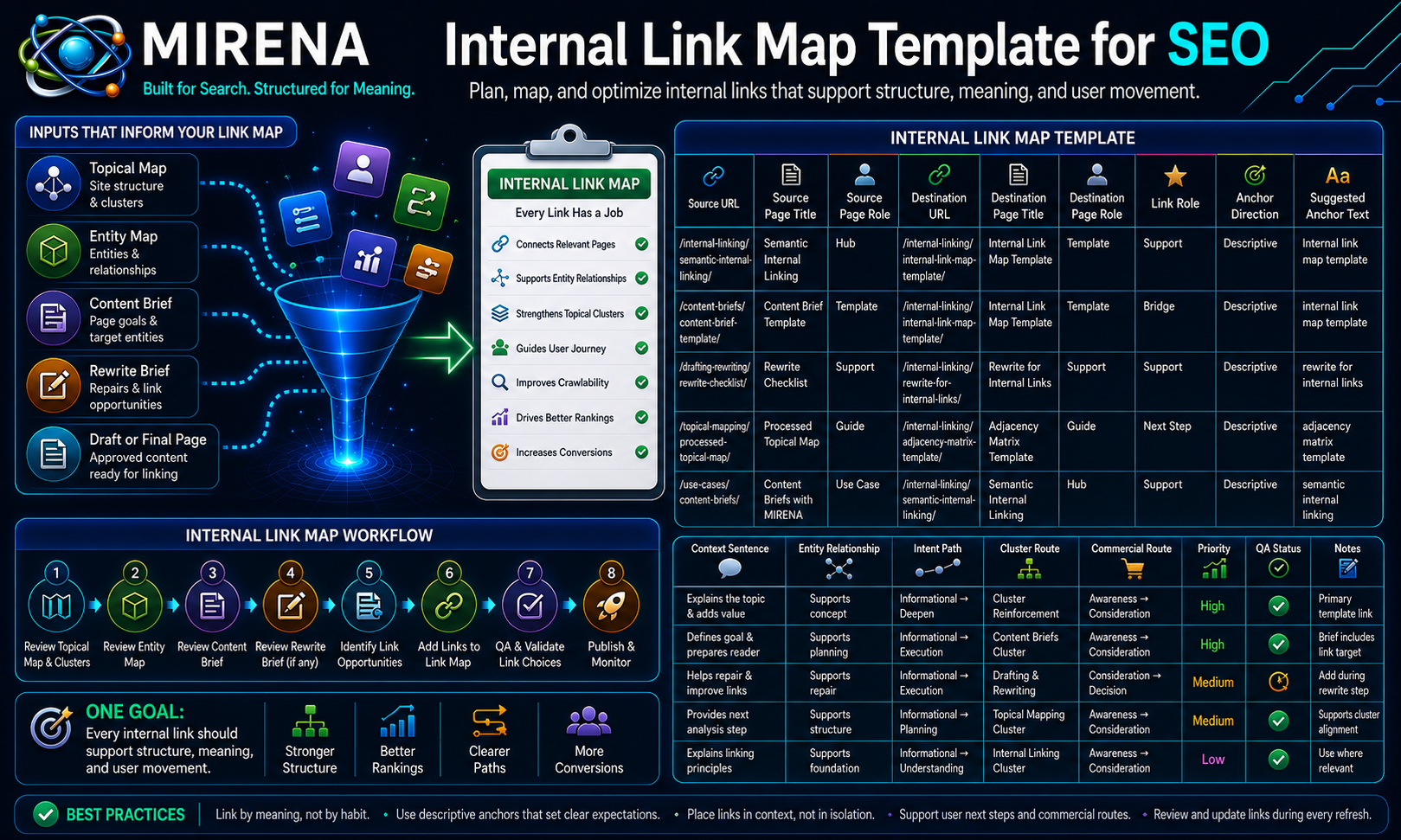
An internal link map template gives every internal link a job.
MIRENA uses this template layer to turn topical maps, entity maps, content briefs, rewrite briefs, and finished drafts into contextual internal link routes. The template records the source page, destination page, page roles, link role, anchor direction, context sentence, entity relationship, search intent path, cluster route, priority, and QA status.
The goal is simple.
Do not add links by habit. Add links because they support structure, meaning, and user movement.
What Is an Internal Link Map Template?
An internal link map template is a planning document for contextual internal links.
It records where the link starts, where the link goes, why the link belongs there, what anchor text should be used, and how the link supports the site structure.
A basic internal link plan may only list source URLs and destination URLs. That is not enough for a growing site. The link still needs context.
A stronger template records:
- source page
- destination page
- source page role
- destination page role
- link role
- anchor direction
- suggested anchor text
- context sentence
- entity relationship
- search intent path
- cluster route
- commercial route
- QA status
For a wider explanation of linking by meaning, the semantic internal linking framework explains how internal links reinforce topic relationships instead of only moving readers through navigation.
MIRENA uses this template to connect pages as part of the full workflow:
Source Context → Processed Topical Map → Entity Map → Content Brief → Rewrite Brief → Draft or Rewrite → Internal Link Map → Publishing QA
The internal link map sits near the end of the workflow, but it should not be an afterthought. It should carry decisions from the map, brief, rewrite, and entity plan into the final page.
When to Use an Internal Link Map Template
Use an internal link map template whenever a page needs a clear link route before publishing.
That can happen after planning, after briefing, after rewriting, or during site cleanup.
The template is useful:
- after a processed topical map
- after a content brief
- after a rewrite brief
- before publishing a new page
- before republishing a repaired page
- during a refresh project
- during orphan page recovery
- during cluster cleanup
- during content consolidation
- during commercial page support planning
A processed topical map can show planned routes early. The raw vs processed topical map workflow helps define which pages exist, what each page does, and where the cluster needs links.
The content brief workflow can then carry those route decisions into page instructions. A brief can name target pages, anchor direction, and link placement zones before the writer starts.
After a page is repaired, the Drafting + Rewriting with MIRENA workflow can pass link repair notes into the internal link map. That keeps the repaired page connected to the right cluster instead of leaving the link work to the end.
What the Internal Link Map Template Includes
The template should capture the link origin, link target, link purpose, anchor direction, user path, entity relationship, and editorial status.
| Field | Purpose |
|---|---|
| Source URL | Link origin |
| Destination URL | Link target |
| Page role | Page job |
| Link role | Link job |
| Anchor direction | Anchor intent |
| Context sentence | Link placement |
| Entity relationship | Meaning link |
| Intent path | User continuity |
| Cluster route | Site path |
| QA status | Publish check |
This field set turns internal linking into a reviewable process.
The source to destination structure also connects to the internal link adjacency matrix, where page relationships can be viewed as a link graph rather than a loose list of recommendations.
Internal Link Map Template Fields
Each field should help editors understand why the link exists, where it belongs, and how it supports the cluster.
Source URL
The source URL is the page where the internal link will be placed.
Use the full URL. Confirm that the page is indexable and that the source page has enough context for the destination link.
Example:
text
https://semantecseo.com/drafting-rewriting/rewrite-for-search-intent/The source page should not be selected only because it is convenient. It should have a clear relationship with the destination page.
Source Page Title
The source page title helps editors identify the origin page without opening every URL.
Use the published title or working title. Keep it consistent with the page inventory.
Example:
text
Rewrite for Search IntentSource Page Role
The source page role records the job of the page sending the link.
Use clear values:
- hub
- spoke
- bridge
- support
- comparison
- conversion
- proof
- docs
- template
- example
A source page role helps editors understand why the source page has authority or context for the link.
For example, a hub page may link to a spoke because the spoke gives more detail. A rewrite support page may link to an internal linking page because the rewrite process needs link repair.
Source Cluster
The source cluster records the topic area the origin page belongs to.
Examples:
- internal linking
- content briefs
- topical mapping
- entity SEO
- semantic SEO
- drafting and rewriting
- information gain
- schema
- templates
- examples
This field helps prevent links that jump into weak or unrelated topic areas.
Destination URL
The destination URL is the page receiving the internal link.
Use the full URL. Confirm the destination is live, indexable, and aligned with the source context.
Example:
text
https://semantecseo.com/internal-linking/anchor-text-by-intent/The destination page should give the reader a useful next step. It should not be chosen only because it needs more links.
Destination Page Title
The destination page title helps editors verify the target page.
Example:
text
Anchor Text by IntentThis field is useful when several URLs have similar names or similar topics.
Destination Page Role
The destination page role explains why the source page should link to that URL.
For example:
- A hub may receive links from spokes.
- A template may receive links from process pages.
- A pricing page may receive links from commercial pages.
- A proof page may receive links from claim-heavy sections.
- A docs page may receive links from workflow explanations.
The role should match the reader’s next action.
Destination Cluster
The destination cluster records the topic area receiving the link.
This helps editors avoid accidental jumps across the site.
For example, a page about rewrite diagnosis may link to internal links for refresh projects if the paragraph discusses link repair after content updates. That is a clean route from rewrite repair to internal link repair.
Link Role
The link role defines the job of the internal link.
Use values such as:
- hub to spoke
- spoke to hub
- sibling support
- entity support
- bridge route
- proof route
- commercial route
- docs route
- orphan recovery
- refresh repair
- consolidation support
This field is one of the most important parts of the template. It forces the team to name why the link exists.
Anchor Direction
Anchor direction explains what the anchor should help the reader do next.
Examples:
- explain the concept
- move to the next workflow step
- compare related methods
- support an entity
- route to pricing
- send the reader to a template
- recover an orphan page
Anchor direction comes before final anchor text. It gives the writer and editor the intent behind the link.
Suggested Anchor Text
Suggested anchor text is the visible text used for the link.
Good anchors describe the destination page and fit naturally inside the sentence.
Examples:
- semantic internal linking
- anchor text by intent
- internal link audit
- internal link adjacency matrix
- orphan page recovery
- rewrite for search intent
- content brief workflow
- processed topical map
Avoid vague anchors like “click here,” “read more,” “this article,” or “next page.” They do not help users understand the link destination.
Context Sentence
The context sentence is the sentence that will contain the internal link.
Write the sentence before inserting the link. The link should feel like part of the explanation, not a separate instruction.
Example:
text
A rewrite that changes page intent should also review anchor text by intent so the repaired page sends users to the right next step.Then place the link where it fits:
A rewrite that changes page intent should also review anchor text by intent so the repaired page sends users to the right next step.
Entity Relationship
The entity relationship records the concept pair the link supports.
Examples:
- internal link audit to orphan page recovery
- content brief to internal link briefing
- topical map to cluster route
- rewrite brief to link repair
- entity map to anchor text
- schema to entity identity
A link should connect related entities, not just similar words.
The entity map workflow can provide the entity pairs used in an internal link map. The entity salience process can also help decide where a link should sit near important entity mentions.
Search Intent Path
The search intent path records the user’s intent before and after the click.
Examples:
- diagnosis to repair
- definition to process
- process to template
- template to example
- example to use case
- use case to pricing
- entity learning to content brief
- rewrite diagnosis to link repair
This field helps keep the reader journey coherent.
User Path
The user path explains how the link helps the reader move through the workflow.
For MIRENA, that path may move from a topical map to a brief, from a brief to a rewrite, or from a rewrite to an internal link map.
A clear user path helps prevent links that interrupt the page.
Cluster Route
The cluster route records the wider site path supported by the link.
Examples:
- internal linking cluster
- content briefs cluster
- drafting and rewriting cluster
- topical mapping cluster
- entity SEO cluster
- product and pricing route
A link can stay inside one cluster or bridge two clusters. The route should be named so editors can review it.
Commercial Route
The commercial route records if the link supports a use case, product page, proof page, or pricing path.
Examples:
- template to use case
- use case to pricing
- process page to MIRENA
- proof page to pricing
- docs page to output explanation
This field stops commercial links from being added randomly. A commercial link should fit the paragraph and the reader’s stage.
Placement Zone
The placement zone shows where the link should sit on the source page.
Useful placement values include:
- intro
- definition block
- process section
- comparison section
- example section
- QA section
- CTA paragraph
- FAQ answer
A link near the right entity or process step is usually stronger than a link placed at the bottom of the page without context.
Priority
Priority tells the editor how important the link is.
Use:
- high
- medium
- low
High priority links may support key commercial routes, orphan recovery, hub to spoke structure, or core workflow paths.
QA Status
QA status tracks the editorial state of the link.
Use:
- proposed
- approved
- added
- checked
- rejected
- revisit
This field makes internal linking easier to review before publishing.
Reviewer Notes
Reviewer notes should stay short.
Use this field for comments such as:
- anchor too broad
- destination not live
- better destination needed
- commercial page needs support
- add after rewrite is published
- check if source page is indexable
The notes field should not become a second brief. Keep the decision clear.
How to Fill Out the Template
Start with the page inventory, then move from page roles to link roles.
The goal is to record link decisions before links are added to the page.
- Start with the page inventory.
- Label each page role.
- Group pages by cluster.
- Mark hub pages and core spokes.
- Identify bridge pages.
- Add commercial destinations.
- Match source pages to destination pages.
- Assign link roles.
- Write anchor direction.
- Draft context sentences.
- Check entity relationships.
- Check search intent continuity.
- Add priority.
- Review before publishing.
Start with the page inventory from the processed topical map, then use semantic internal linking to decide how each source page should support the destination page.
If the link is being planned inside a brief, the internal link briefing process should carry the target URL, anchor direction, and context note into the writer’s instructions.
Example Internal Link Map Row
This example shows how a rewrite support page can route a reader into anchor planning.
| Field | Example |
|---|---|
| Source URL | https://semantecseo.com/drafting-rewriting/rewrite-for-search-intent/ |
| Source role | Rewrite support |
| Destination URL | https://semantecseo.com/internal-linking/anchor-text-by-intent/ |
| Destination role | Internal link spoke |
| Link role | Bridge route |
| Anchor | anchor text by intent |
| Entity pair | search intent + anchor text |
| Intent path | repair to planning |
| Priority | High |
| Status | Proposed |
The source page diagnoses search intent problems in rewritten content. The destination page explains how to choose anchor text based on the reader’s next step.
The context sentence could read:
A rewrite that changes page intent should also review anchor text by intent so the repaired page sends users to the right next step.
That sentence gives the link a reason to exist. It connects the rewrite task to the anchor planning task.
Link Roles to Include in the Map
Link roles keep internal links from turning into random recommendations.
Each role explains why the link belongs in the map.
Hub to Spoke
A hub to spoke link sends the reader from a broad page to a focused child page.
Example route:
text
https://semantecseo.com/internal-linking/
→ https://semantecseo.com/internal-linking/anchor-text-by-intent/
This link role helps the hub page distribute readers into more specific internal linking topics.
Spoke to Hub
A spoke to hub link sends the reader back to the broader cluster page.
Example route:
text
https://semantecseo.com/internal-linking/anchor-text-by-intent/
→ https://semantecseo.com/internal-linking/
This link role helps search systems and users understand the parent topic.
Sibling Support
A sibling support link connects two pages inside the same cluster.
Example route:
text
https://semantecseo.com/internal-linking/link-depth-and-page-importance/
→ https://semantecseo.com/internal-linking/deep-link-distribution/
This role works when two pages support adjacent tasks.
Bridge Route
A bridge route connects one cluster to another.
Example route:
text
https://semantecseo.com/content-briefs/internal-link-briefing/
→ https://semantecseo.com/internal-linking/semantic-internal-linking/
A bridge route is useful when the user needs to move from planning into execution. A content brief page may need to send the reader into the internal linking cluster when link placement becomes the next task.
Entity Support
An entity support link sends the reader to a page that explains a related entity.
Example route:
text
https://semantecseo.com/content-briefs/entity-led-brief/
→ https://semantecseo.com/entity-seo/entity-salience/
This works because an entity-led brief needs salience rules. The link reinforces the relationship between the brief and the entity placement system.
Proof Route
A proof route sends the reader from a claim, method, or workflow into an example or result page.
Example route:
text
https://semantecseo.com/templates/internal-link-map-template/
→ https://semantecseo.com/examples/internal-link-map-example/
Use this role when a page explains a method and the reader needs to see the method applied.
Commercial Route
A commercial route sends the reader from an educational or template page into a use case, product page, or pricing page.
Example route:
text
https://semantecseo.com/internal-linking/semantic-internal-linking/
→ https://semantecseo.com/use-cases/drafting-rewriting/
This role should only be used when the commercial page is a natural next step.
For this template, a strong commercial route is to build an internal link map with MIRENA after the user understands the manual process.
Docs Route
A docs route sends the reader to setup, input, output, or workflow information.
Example route:
text
https://semantecseo.com/templates/internal-link-map-template/
→ https://semantecseo.com/docs/outputs/
This role helps users understand how the output works before they commit to the workflow.
Orphan Recovery
An orphan recovery link connects a relevant indexed page to a page that has no meaningful internal links.
Example route:
text
https://semantecseo.com/internal-linking/internal-link-audit/
→ https://semantecseo.com/internal-linking/orphan-page-recovery/
This role should be marked clearly in the template so the editor knows the link is part of a recovery action.
How to Choose Anchor Direction
Anchor direction explains the intent behind the anchor before the final anchor text is added.
Good anchor direction answers five questions:
- What does the destination page help the reader do?
- What entity does the link support?
- What intent does the reader carry into the click?
- What workflow step comes next?
- Does the anchor describe the destination page clearly?
Good anchor patterns include:
- semantic internal linking
- anchor text by intent
- internal link audit
- orphan page recovery
- internal link adjacency matrix
- internal links for refresh projects
- hub and spoke internal linking
- contextual internal links
- commercial route links
Weak anchor patterns include:
- click here
- read more
- this article
- learn more
- related page
- more info
- next page
For deeper anchor planning, the anchor text by intent process shows how anchor text should match the reader’s next step instead of repeating the same phrase across the site.
Anchor variation also helps. Do not use the same exact anchor every time. A page about anchor planning can receive links with anchors such as “anchor text by intent,” “intent aware anchor text,” or “anchor text that matches the next step,” as long as each phrase fits the sentence.
How to Map Entity Relationships
An entity relationship is the connection between the concept on the source page and the concept on the destination page.
Strong internal links connect related entities, not just similar keywords.
For example, a link from an entity-led brief to entity salience is stronger than a random link to a broad SEO page. The relationship is clear: the brief needs entities, and salience controls how those entities are weighted and placed.
Entity relationship examples include:
- topical map connects to cluster role
- content brief connects to entity salience
- rewrite connects to search intent
- internal link audit connects to orphan recovery
- anchor text connects to user path
- schema connects to entity identity
The entity salience process helps explain why some internal links should sit near important entity mentions instead of being added at the bottom of a page.
The entity map workflow can provide the entity pairs used inside the internal link map. When the entity map identifies the relationship between “content brief” and “internal link target,” the link plan can use that relationship to choose better destinations.
How to Preserve Search Intent Continuity
A useful internal link should not send the reader into a disconnected task.
The destination page should continue, deepen, or complete the user path.
Good intent paths include:
- definition to process
- process to template
- template to example
- example to use case
- use case to pricing
- diagnosis to repair
- repair to QA
For example, a reader on a page about rewriting for search intent may be ready to review anchor text, link targets, or page role. A link to anchor text by intent fits that path because the rewrite has changed the purpose of the page.
Intent continuity becomes easier to maintain when the brief already names the page format and next action. That is why the intent-led brief process should feed the internal link map.
How to Use the Template After a Rewrite
The rewrite fixes the page.
The internal link map reconnects the page.
A rewrite brief can diagnose weak links, but this template records the repair actions. That is useful when a page has changed its purpose, structure, entity focus, or CTA route.
After a rewrite, the page may need:
- new links to support pages
- removed links to off-scope pages
- stronger anchors
- links to commercial routes
- links to proof pages
- links from older pages into the rewritten page
- orphan recovery links
- updated link status after publishing
If the page is being repaired, start from the rewrite existing content workflow, then move the repaired page into an internal link map.
When the rewrite changes page intent, the rewrite for search intent process should guide which destination pages still fit the new page purpose.
For content refresh projects, internal links for refresh projects can support link repair after content updates.
How to Use the Template for Orphan Page Recovery
An orphan page needs a source page, not only a destination URL.
The internal link map records where the recovery link should come from and why it fits.
Use this recovery workflow:
- Find the orphan page.
- Identify its primary entity.
- Find the closest hub or spoke page.
- Add at least one contextual source link.
- Add one sibling or bridge route if useful.
- Choose anchor text tied to the page role.
- Mark recovery links in the template.
- Recheck after publishing.
For orphan recovery, add these fields to the map:
- orphan URL
- closest hub
- closest spoke
- support source URL
- proposed anchor
- context sentence
- entity relationship
- priority
- publish status
The orphan page recovery process should connect with the internal link audit so weak pages can be found and repaired inside the same workflow.
A recovery link should not be forced into a random page. It should come from a page that shares a close entity, cluster route, or user path.
How MIRENA Builds an Internal Link Map
MIRENA can build an internal link map from source context, a processed topical map, an entity map, a content brief, a rewrite brief, a sitemap, a URL inventory, a finished draft, or a refresh audit.
The output can include:
- link map
- source to destination pairs
- anchor suggestions
- entity relationship notes
- orphan page flags
- link priority
- commercial route suggestions
- editorial QA notes
MIRENA does not only list links. It ties each link to a role, context, anchor direction, entity relationship, and workflow path.
The process can begin with MIRENA content briefs, move into Drafting + Rewriting with MIRENA, then finish with an internal link map before publishing QA.
For teams that need the full system, the product page at MIRENA explains how the workflow connects planning, briefs, rewrites, and link routes.
Copy the Internal Link Map Template
Use this table as the working format for planning contextual internal links.
Keep each row short. Add reviewer notes only when a link needs extra explanation.
| Field | Entry |
|---|---|
| Source URL | |
| Source title | |
| Source role | |
| Source cluster | |
| Destination URL | |
| Destination title | |
| Destination role | |
| Destination cluster | |
| Link role | |
| Anchor direction | |
| Suggested anchor | |
| Context sentence | |
| Entity relationship | |
| Search intent path | |
| User path | |
| Cluster route | |
| Commercial route | |
| Placement zone | |
| Priority | |
| QA status | |
| Reviewer notes |
Use the template manually for small clusters. Use MIRENA when the link map needs to connect many pages, clusters, rewrites, briefs, and source documents.
Optional Advanced Fields
Add advanced fields when the site has a large inventory, complex clusters, or strict publishing review.
Useful advanced fields include:
- source traffic level
- destination priority
- current link count
- existing anchor text
- replacement anchor
- page depth
- indexing status
- orphan risk
- last updated date
- publishing owner
- approval date
- broken link check
- SERP feature connection
- schema connection
These fields help large teams review link actions with more control.
For example, a page with high traffic may be a strong source URL for a new support page. A page with weak indexation may need a recovery link from a stronger cluster page. A destination page with too many repeated anchors may need anchor variation before more links are added.
Internal Link Map QA Checklist
Review every proposed link before publishing.
Use this checklist:
- Source URL is correct.
- Destination URL is live.
- Destination page fits the source context.
- Page roles are labeled.
- Link role is clear.
- Anchor text describes the destination page.
- Anchor text fits the context sentence.
- The link supports an entity relationship.
- The link supports search intent continuity.
- The link supports a cluster route.
- Commercial route is included when relevant.
- Orphan page recovery links are flagged.
- Duplicate anchors are reviewed.
- Broken links are checked.
- The link does not distract from the page purpose.
- The editor has approved the link.
For larger sites, this QA step should connect to the internal link audit workflow so link rules, checks, and ownership are reviewed before publishing.
A strong link map should be easy to review. If an editor cannot understand why a link belongs, the link probably needs a better context sentence, a clearer anchor, or a different destination.
Build Internal Link Maps with MIRENA
Use the template manually for small clusters.
Use MIRENA when your link map needs to connect topical maps, entity maps, briefs, rewrites, and page inventories across a larger site.
MIRENA can move from source context to processed map, from map to brief, from brief to rewrite, and from rewrite to internal link map.
That gives each link a reason to exist before the page is published.
To build the map inside the full workflow, start with MIRENA pricing. To see how link mapping fits after repair work, review Drafting + Rewriting with MIRENA. To understand what each workflow returns, see MIRENA outputs.
FAQs About Internal Link Map Templates
What is an internal link map template?
An internal link map template is a planning format for internal links.
It records the source URL, destination URL, page role, link role, anchor direction, context sentence, entity relationship, search intent path, cluster route, priority, and QA status.
What should an internal link map include?
An internal link map should include the source page, destination page, page roles, link role, anchor text, context sentence, entity relationship, intent path, cluster route, commercial route, placement zone, priority, and review status.
The goal is to show why each link belongs in the page before the link is added.
How do you choose anchor text for internal links?
Choose anchor text that describes the destination page and fits the sentence around it.
The anchor should tell the reader what they will get after clicking. It should also support the entity relationship between the source page and destination page.
How do you map internal links for SEO?
Start with a page inventory. Label page roles, group pages by cluster, select destination pages, assign link roles, write anchor direction, draft context sentences, and check that each link supports the user path and cluster structure.
A template makes those choices easier to review before publishing.
What is the difference between an internal link audit and an internal link map?
An internal link audit finds weak links, missing routes, orphan pages, crawl issues, and poor anchors.
An internal link map turns those findings into source to destination link actions.
The audit diagnoses the problem. The map records the repair.
How does an internal link map help orphan page recovery?
An internal link map helps orphan page recovery by finding relevant source pages that can link to the orphan page with contextual anchors.
It also records the entity relationship, page role, and priority for the recovery link.
Can a content brief include internal link targets?
Yes.
A content brief should include internal link targets, anchor direction, and destination page notes. That helps the writer place links in the right sections before the page reaches editorial review.
Can MIRENA create an internal link map?
Yes.
MIRENA can use source context, topical maps, entity maps, briefs, rewrites, sitemaps, and URL inventories to build contextual internal link routes with anchor direction, entity relationships, cluster paths, and QA notes.