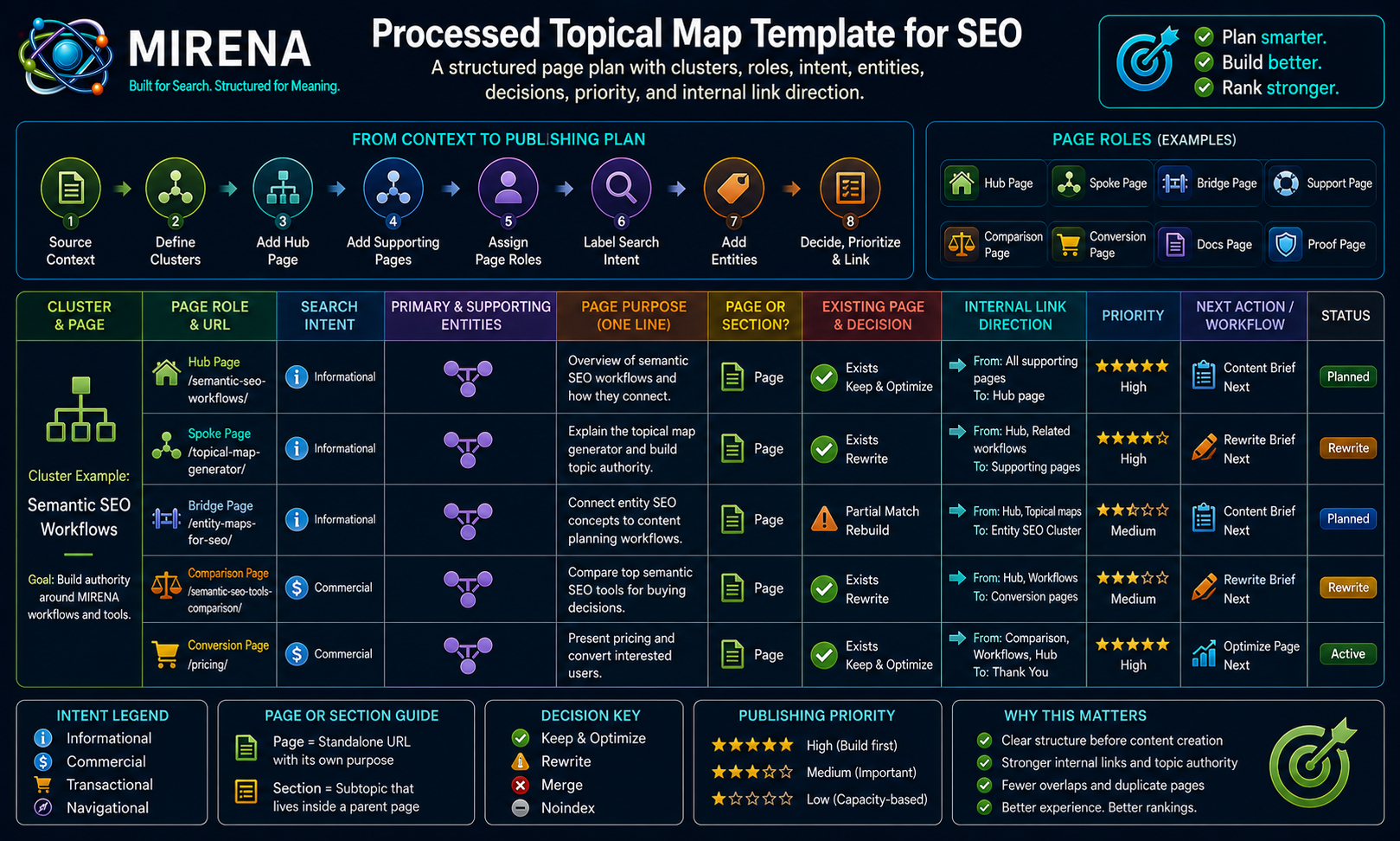
A processed topical map template is a structured SEO planning format that turns source context, keywords, sitemaps, and entity research into a page plan with clusters, page roles, intent labels, page vs section decisions, publishing priority, and internal link direction.
Use it after preparing source context for MIRENA, before creating content briefs, rewrite briefs, internal link maps, information gain audits, SERP feature briefs, or semantic optimization reports.
The goal is not to collect more topic ideas.
The goal is to decide what the site should build, what it should merge, what it should rewrite, and how every page should connect.
What Is a Processed Topical Map Template?
A processed topical map template is a page planning format for SEO.
It organizes clusters, page roles, search intent, entities, page purpose, page vs section decisions, publishing order, and internal link direction so a topic plan becomes a working site structure.
A processed topical map is a page architecture, not a list of topics.
It helps answer practical questions:
- Which pages should exist?
- Which topics should become sections?
- Which existing pages should be rewritten?
- Which pages overlap?
- Which pages should merge?
- Which pages should support commercial routes?
- Which internal links should be planned before drafting?
- Which pages need briefs first?
- Which pages need proof, examples, or schema notes?
That makes the map useful for writers, editors, SEOs, founders, and site owners.
MIRENA can create this structure through the processed topical map generator using source context, sitemaps, keyword exports, existing URLs, and entity research.
Raw Topical Map vs Processed Topical Map
A raw topical map can show related ideas.
A processed topical map decides how those ideas should become pages, sections, links, briefs, or rewrites.
| Raw Map | Processed Map |
|---|---|
| Topic ideas | Page plan |
| Keyword groups | Page roles |
| Loose clusters | Governed structure |
| No route logic | Internal link direction |
| No page purpose | Intent and page job |
| No status | Publishing workflow |
A raw map may show that several terms belong together.
That still leaves the hard decisions open.
A processed topical map goes further. It decides which page should own the topic, what role the page should play, which intent it should serve, which entities it should cover, and how it should link to nearby pages.
That is why the processed version is stronger for production.
It gives the team a working document before briefs, drafts, rewrites, and internal links begin.
Why Page Roles Belong Inside the Map
Page roles stop every URL from being treated the same.
A page plan becomes clearer when each URL has a defined job before the brief is written.
Hub Page
A hub page organizes the main cluster.
It should route users toward important spokes, support pages, examples, docs, and commercial paths.
Spoke Page
A spoke page covers a focused subtopic.
It supports the hub and links back to the broader cluster.
Bridge Page
A bridge page connects adjacent clusters.
For example, topical mapping may connect naturally to content briefs, internal links, entity SEO, and rewrites.
Support Page
A support page strengthens depth around a concept, attribute, question, use case, or process.
It helps the cluster explain the topic in more detail.
Comparison Page
A comparison page helps users choose between tools, methods, workflows, or options.
It often needs tables, proof, and decision support.
Conversion Page
A conversion page routes qualified users toward pricing, product, demo, signup, or contact paths.
It should receive contextual support from educational and comparison pages.
Docs Page
A docs page explains a process, output, input, workflow, or product mechanic.
Docs pages often support product confidence and user education.
Proof Page
A proof page supports trust with examples, screenshots, results, use cases, before and after notes, or customer evidence.
These roles make content briefs from processed maps clearer because every brief inherits a page job before drafting starts.
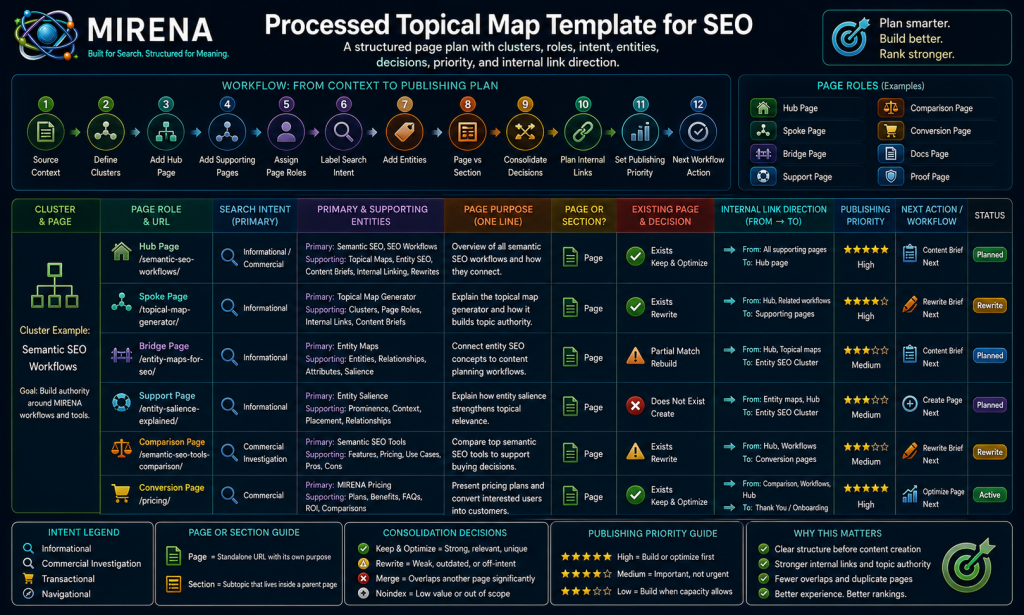
What the Processed Topical Map Template Includes
The template gives each planned URL enough structure to support publishing, rewriting, linking, and review.
A strong processed topical map should include:
- cluster fields
- page role fields
- intent fields
- entity fields
- page purpose fields
- page vs section fields
- consolidation fields
- publishing priority fields
- internal link fields
- brief workflow fields
- rewrite workflow fields
- status fields
These fields keep the map from becoming a loose content calendar.
They also help the team see the next action for every page.
Some pages need briefs.
Some pages need rewrites.
Some pages need internal links.
Some pages need merging.
Some pages should not be published at all.
How to Fill Out a Processed Topical Map Template
Fill the map in workflow order.
Start with context, then cluster structure, then page decisions, then production fields.
- Start with source context.
- Define the main cluster.
- Add the hub page.
- Add supporting pages.
- Assign page roles.
- Label search intent.
- Add primary and supporting entities.
- Decide page vs section.
- Mark merge, rewrite, or noindex candidates.
- Add internal link direction.
- Set publishing priority.
- Add the next workflow action.
This order matters because each decision depends on the one before it.
A page role is weaker without source context.
A brief is weaker without a page role.
An internal link plan is weaker without the cluster structure.
A rewrite is weaker without knowing what the page should become.
Use the entity map for topical planning when the cluster needs stronger primary entities, supporting entities, attributes, and ownership decisions before briefs are created.
Cluster and Page Role Fields
These fields define the structure of the map.
text
Cluster name:
Cluster purpose:
Hub page:
Page title:
Proposed URL:
Page role:
Parent page:
Child pages:
Adjacent cluster:
Bridge page:
Commercial route:
Cluster Name
Name the topical group the page belongs to.
Examples:
text
Topical Mapping
Content Briefs
Entity SEO
Internal Linking
SEO Rewrites
Information Gain
Cluster Purpose
State why the cluster exists.
A weak cluster purpose might say:
text
Articles about topical maps.A stronger cluster purpose would say:
text
Help SEO teams understand, build, process, brief, link, and maintain topical maps with MIRENA.The second version explains the workflow.
Hub Page
Identify the page that organizes the cluster.
The hub page should not carry every detail.
It should guide users toward the right supporting pages.
Page Title
Use a working title that describes the page’s job.
The title can change later, but the map needs a clear label.
Proposed URL
Add the planned full URL or URL path.
Example:
text
https://semantecseo.com/use-cases/topical-map-generator/Page Role
Assign one main role.
Examples:
text
Hub
Spoke
Bridge
Support
Comparison
Conversion
Docs
Proof
A page can support more than one job, but the map should identify its lead role.
Parent Page
Name the page that sits above this URL in the cluster.
This helps with hierarchy and internal links.
Child Pages
List pages that should sit below or support this URL.
This helps build hub and spoke relationships.
Adjacent Cluster
Name the nearby cluster this page connects to.
For example, topical mapping may connect to entity mapping, content briefs, internal linking, and rewrites.
Bridge Page
Name the page that connects two clusters.
Bridge pages help users move between related workflows without forcing unnatural links.
Commercial Route
Name the commercial destination the page should support.
Examples:
text
https://semantecseo.com/pricing/
https://semantecseo.com/use-cases/topical-map-generator/
https://semantecseo.com/docs/outputs/
Intent, Entity, and Page Purpose Fields
These fields turn a topic into a page job.
text
Primary query:
Secondary queries:
Search intent:
Page purpose:
Primary entity:
Supporting entities:
Entity attributes:
Information gain angle:
SERP feature target:
Primary Query
The primary query shows the main search demand.
Example:
text
processed topical map templateSecondary Queries
Secondary queries help expand the page without drifting.
Examples:
text
topical map template
SEO topical map template
topical authority map template
topic cluster template
Search Intent
Label the dominant intent.
Common labels include:
text
Informational
Commercial investigation
Comparative
Transactional
Navigational
For this page, the intent is informational with commercial investigation.
The user wants the template, but may also want to know how MIRENA creates the map.
Page Purpose
Define what the page should do.
For example:
text
Give users a copyable processed topical map template and explain how to use it before creating briefs, rewrites, and internal links.This field keeps the page focused.
Primary Entity
Name the main concept the page should own.
For this page:
text
processed topical map templateSupporting Entities
List the related concepts the page needs to cover.
Examples:
text
topical map
source context
page roles
clusters
search intent
internal links
content briefs
SEO rewrites
entity maps
information gain
Entity Attributes
Attributes explain the details users expect around the entity.
For a processed topical map template, attributes include:
text
cluster fields
page role fields
intent labels
entity fields
page vs section decisions
publishing priority
internal link direction
workflow status
Information Gain Angle
Add the useful difference the page should provide.
Example:
text
The template does not only list topics. It decides page roles, page vs section logic, merge candidates, internal links, and next workflow actions.SERP Feature Target
Add the intended format.
Examples:
text
Paragraph snippet
Ordered list snippet
Comparison table
FAQPage
Copyable template block
The SERP feature brief generator can turn those targets into writing instructions before drafting.
Page vs Section and Consolidation Fields
A processed topical map should decide what not to publish.
Not every topic deserves a standalone URL.
text
Page vs section:
Reason:
Duplicate intent risk:
Cannibalization risk:
Merge candidate:
Rewrite candidate:
Noindex candidate:
Redirect candidate:
Keep as support page:
Page vs Section
Mark if the idea deserves a standalone page.
Use:
text
Page
Section
Maybe
A topic should become a page only when it has clear intent, enough value, and a distinct job in the cluster.
Reason
Explain the decision.
Example:
text
Standalone page because the query has template intent and needs a copyable format, field explanations, and workflow routing.Duplicate Intent Risk
Mark if another page already satisfies the same user need.
This protects the site from overlap.
Cannibalization Risk
Mark if the new page may compete with an existing URL.
This is especially important for large content libraries.
Merge Candidate
Use this when two pages should become one stronger URL.
Rewrite Candidate
Use this when the existing page has value but needs repair.
A weak existing URL can move into rewrite briefs from topical maps instead of creating a new page.
Noindex Candidate
Use this for pages that serve users but should not be indexed.
Examples may include thin utility pages, filtered pages, or internal-only resources.
Redirect Candidate
Use this when an old page should point to a stronger replacement.
Keep as Support Page
Use this when the page should exist, but only as a supporting URL inside a wider cluster.
These fields prevent content sprawl.
They also help the team avoid creating a page for every keyword.
Publishing Priority and Workflow Status Fields
A processed topical map should work as a production system.
It should not stop at planning.
text
Priority:
Publishing order:
Status:
Owner:
Brief needed:
Rewrite needed:
Internal links needed:
Proof needed:
Schema notes needed:
Priority
Mark the importance of the page.
Use simple labels:
text
High
Medium
Low
or a score:
text
1
2
3
Publishing Order
Show the planned sequence.
This helps teams publish foundational pages before dependent support pages.
Status
Track where the page is in the workflow.
Examples:
text
Idea
Approved
Brief needed
Drafting
Rewrite needed
Internal links needed
Ready for review
Published
Owner
Name the person responsible for the next step.
This helps the map operate as a production tracker.
Brief Needed
Mark if the page needs a writer brief.
If yes, route it into the content brief generator.
Rewrite Needed
Mark if an existing page needs structural repair.
If yes, route it into the SEO rewrite generator.
Internal Links Needed
Mark if the page needs support links, hub links, spoke links, bridge links, or commercial links.
Proof Needed
Mark if the page needs examples, screenshots, comparisons, case notes, or outcomes.
Schema Notes Needed
Mark if the page needs FAQPage, BreadcrumbList, SoftwareApplication, Product, HowTo, or another schema cue.
Internal Link and Anchor Direction Fields
Internal links should be planned inside the map before drafting begins.
text
Links from this page:
Links to this page:
Anchor direction:
Hub link:
Spoke links:
Bridge links:
Commercial links:
Support links:
Links From This Page
List the URLs this page should link to.
These should be contextually relevant.
Links To This Page
List the URLs that should support this page.
This helps prevent orphan pages.
Anchor Direction
Describe the anchor style.
Use anchors that match the reader’s next step.
Examples:
text
processed topical map generator
source context before topical mapping
content briefs from processed maps
internal link map from a topical map
Avoid weak anchors like:
text
click here
read more
this page
Hub Link
Show the cluster hub this page should link to.
Spoke Links
List supporting pages the page should route users toward.
Bridge Links
List pages that connect adjacent clusters.
Commercial Links
Name pricing, product, use case, output, demo, or contact pages the page should support.
Support Links
List supporting definitions, examples, templates, or docs pages.
A processed map can become an internal link map from a topical map when the site needs fuller routing across hubs, spokes, bridge pages, support pages, proof pages, and conversion pages.
Copyable Processed Topical Map Template
Copy this template and fill it after source context is ready.
text
PROCESSED TOPICAL MAP TEMPLATE

CLUSTER CONTEXT

Cluster name:
Cluster purpose:
Source context used:
Primary audience:
Commercial route:
Allowed topic scope:
Excluded topic scope:


PAGE INVENTORY

Page title:
Proposed URL:
Existing URL:
Page role:
Hub / spoke / bridge / support / comparison / conversion / docs / proof
Parent page:
Child pages:
Adjacent cluster:
Current status:
New / existing / rewrite / merge / noindex / redirect


INTENT AND QUERY CONTEXT

Primary query:
Secondary queries:
Search intent:
Informational / commercial investigation / comparative / transactional / navigational
Page purpose:
Reader state:
SERP feature target:
Paragraph snippet / list snippet / table / FAQ / PAA / comparison block


ENTITY CONTEXT

Primary entity:
Supporting entities:
Entity attributes:
Missing entities:
Entity owner page:
Semantic overlap risk:
Information gain angle:


PAGE VS SECTION DECISION

Should this be a standalone page?
Yes / No / Maybe
If no, place inside:
Reason:
Duplicate intent risk:
Cannibalization risk:
Merge candidate:
Rewrite candidate:


INTERNAL LINK CONTEXT

Links from this page:
Links to this page:
Hub link:
Spoke links:
Bridge links:
Support links:
Commercial links:
Anchor direction:
Anchors to avoid:


WORKFLOW STATUS

Priority:
Publishing order:
Owner:
Brief needed:
Rewrite needed:
Internal links needed:
Proof needed:
Schema notes:
Next MIRENA workflow:
Topical map / entity map / content brief / rewrite brief / internal link map / information gain audit / semantic optimization
Processed Topical Map Example
This partial example shows how a MIRENA use case page could appear inside a processed topical map.
text
Cluster name:
Topical Mapping

Cluster purpose:
Help SEO teams understand, build, and operationalize processed topical maps through MIRENA.

Page title:
Topical Map Generator for SEO

Proposed URL:
https://semantecseo.com/use-cases/topical-map-generator/

Page role:
Conversion page

Search intent:
Commercial investigation

Page purpose:
Show how MIRENA turns source context, keywords, and sitemaps into processed topical maps.

Primary entity:
Topical map generator

Supporting entities:
Processed topical map, topical mapping, page roles, source context, internal links, content briefs, entity maps.

Page vs section:
Standalone page

Internal link direction:
Link from source context template, processed topical map template, topical map education pages, and content brief generator.

Next MIRENA workflow:
Content brief
This example is short, but it shows the purpose of the processed map.
The page is not just a topic idea.
It has a role, intent, entity focus, URL, link direction, and next workflow action.
How the Map Feeds Briefs, Rewrites, and Internal Links
The processed topical map should control the next workflow step for every page in the cluster.
Content Briefs
The map can feed content briefs from processed maps by passing page role, page purpose, entities, intent, SERP targets, and link targets into the writer brief.
That makes the brief more useful because the writer receives page direction, not just keywords.
Rewrite Briefs
Existing pages marked for repair can move into the SEO rewrite generator with clear notes on what to merge, remove, expand, or restructure.
This helps old pages fit the current map instead of repeating older structural problems.
Internal Link Maps
Internal link fields can move into the internal link map generator so hub, spoke, support, bridge, and commercial routes are planned before content goes live.
This helps teams avoid late link cleanup.
Information Gain Audits
The map can route pages into an information gain audit from the map when a page needs stronger proof, missing relationships, examples, or useful angles.
This is especially helpful when a page risks copying the same SERP structure as competitors.
SERP Feature Briefs
Pages with snippet, FAQ, PAA, table, or comparison opportunities can move into the SERP feature brief generator.
That helps the writer know which formats to use before drafting begins.
Semantic Optimization
Pages that need stronger entity salience or topical continuity can move into semantic optimization from map context before publishing or during refreshes.
This helps improve meaning, entity coverage, and internal links before the page is finalized.
Once the map is complete, review the available MIRENA output types to choose the next workflow.
Processed Topical Map Mistakes to Avoid
Most topical map problems come from treating the map like a keyword cluster instead of a page plan.
Avoid these mistakes:
- using keyword clusters as page plans
- skipping source context
- leaving page roles blank
- creating a page for every keyword
- ignoring existing URLs
- skipping merge candidates
- leaving out page vs section decisions
- adding internal links only after drafting
- skipping publishing priority
- leaving out commercial route
- failing to define the next workflow action
- copying competitor structures without information gain
- listing entities without ownership
- marking too many pages as hubs
- ignoring proof needs
- treating every informational query as a new URL
A processed topical map should help the team make decisions.
If it only lists topics, it is not processed yet.
Use MIRENA to Build a Processed Topical Map
Use the template to plan clusters, page roles, intent labels, entities, page vs section decisions, publishing priority, and internal link direction before moving into briefs, rewrites, or internal links.
A processed topical map gives the site a stronger planning layer.
It helps the team decide what to publish, what to merge, what to rewrite, what to support, and how to route users through the site.
To build the map with MIRENA, start with the topical map generator. To prepare inputs first, use the source context template. To move from planning into production, review MIRENA pricing or compare the available MIRENA output types.
FAQs About Processed Topical Map Templates
What is a processed topical map template?
A processed topical map template is a structured SEO planning format that organizes clusters, page roles, intent, entities, page vs section decisions, publishing priority, and internal link direction.
What should a processed topical map include?
It should include cluster context, page inventory, page roles, search intent, primary entities, supporting entities, page purpose, page vs section decisions, internal links, publishing priority, and workflow status.
How is a processed topical map different from a raw topical map?
A raw topical map groups ideas.
A processed topical map turns those ideas into a governed page plan with roles, intent labels, link direction, publishing order, and workflow actions.
Can I use this template with keywords?
Yes.
Keywords can be used as input, but they should be processed into page roles, entities, intent labels, and page vs section decisions before publishing starts.
Can I use this template with a sitemap?
Yes.
A sitemap can help identify existing pages, rewrite targets, merge candidates, orphan pages, internal link gaps, and missing support pages.
Should a topical map include page roles?
Yes.
Page roles help define what each URL should do before it becomes a brief, draft, rewrite, or internal link target.
Should a topical map include internal links?
Yes.
A processed topical map should include internal link direction so hub, spoke, support, bridge, and commercial pages connect before drafting begins.
How do I decide page vs section?
Decide page vs section by checking search intent, page purpose, entity ownership, duplicate intent risk, existing URL coverage, and the amount of support the topic needs.
Can MIRENA create a processed topical map?
Yes.
MIRENA can turn source context, keywords, sitemaps, entity research, and page inventories into processed topical maps with clusters, roles, intent labels, priorities, and internal link direction.
What happens after the processed topical map is finished?
The map can feed content briefs, rewrite briefs, entity maps, internal link maps, information gain audits, SERP feature briefs, semantic optimization, and publishing workflows.