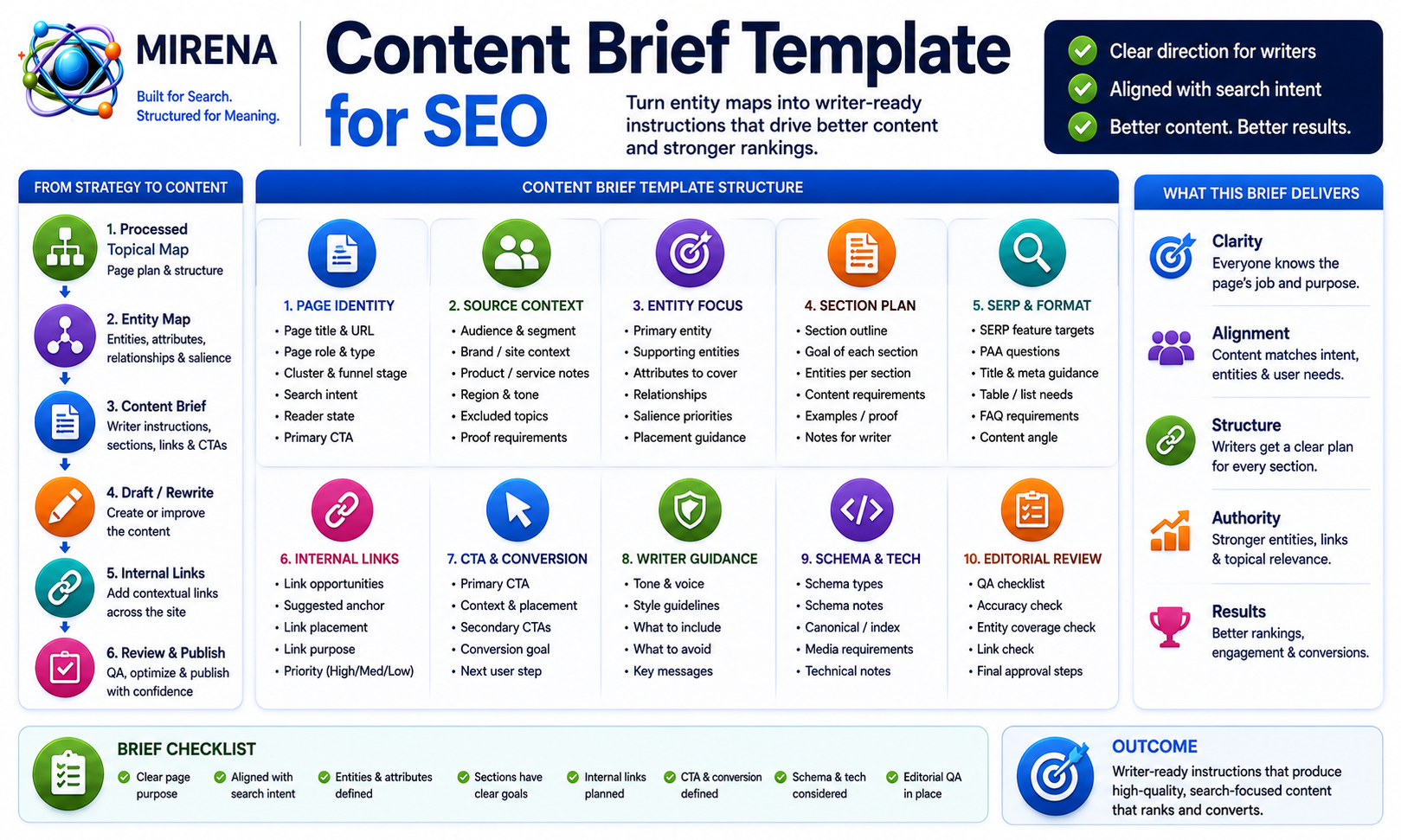
MIRENA’s content brief template helps SEO teams turn entity maps into writer ready production instructions.
Use it to define page purpose, search intent, reader state, primary entities, supporting entities, section instructions, SERP feature targets, internal links, CTA direction, and editorial review checks before drafting begins.
A processed topical map tells you which pages should exist.
An entity map tells you which concepts each page should own and support.
A content brief turns that structure into instructions a writer can follow.
The template below gives you a working format for that step.
What Is a Content Brief Template?
A content brief template is a structured worksheet for turning SEO strategy into writing instructions.
It defines page purpose, search intent, entity coverage, section structure, SERP targets, internal links, CTA direction, and editorial checks before drafting begins.
A basic outline may list headings.
A strong content brief explains what each section should do, which entities belong there, which proof or examples are needed, which internal links should appear, and how the page should move the reader toward the next step.
If you need the core concept first, the guide to what an SEO content brief is explains how briefs connect strategy to writing. This page focuses on the working template used inside the MIRENA workflow.
A strong content brief template should answer:
- What is the page job?
- Who is the reader?
- What search intent leads the structure?
- Which entity does the page own?
- Which supporting entities need coverage?
- Which sections are required?
- What should each section do?
- Which SERP formats should shape the page?
- Which internal links belong in the draft?
- What should the writer avoid?
- How will the editor review the finished draft?
Without those fields, writers are left to infer strategy during drafting.
That creates inconsistent pages, weak structure, and extra editorial cleanup.
Why Content Briefs Follow Entity Maps
The processed topical map comes first.
It defines:
- clusters
- page roles
- page purpose
- intent labels
- page vs section decisions
- publishing priority
- internal link direction
The entity map comes next.
It defines:
- primary entity ownership
- supporting entities
- entity attributes
- entity relationships
- salience priorities
- schema cues
- contextual internal link direction
- brief ready entity instructions
The content brief comes after that.
It turns the page plan and entity structure into writer instructions.
The entity map template gives the semantic layer. The content brief template turns that semantic layer into section goals, examples, FAQs, proof requirements, SERP targets, internal links, CTA direction, and editorial checks.
That order helps prevent weak briefs.
If a team starts with a keyword and jumps straight to headings, the brief may miss the page role, entity ownership, and internal link structure. A better workflow starts with the page plan, adds the entity layer, then creates the writing instructions.
The workflow should look like this:
- Build the source context.
- Create the processed topical map.
- Build the entity map.
- Create the content brief.
- Draft or rewrite the page.
- Add contextual internal links.
- Review the page against the brief.
Teams that want MIRENA to generate the brief from upstream inputs can use the content brief generator workflow after the entity map has been reviewed.
Content Brief Template Fields
Use the fields below to turn an entity map into a structured SEO content brief.
The template can live in a spreadsheet, Notion database, CMS workflow, project board, or MIRENA output.
The format can change. The logic should stay consistent.
Page Identity Fields
Start with the page identity.
These fields connect the brief to the processed topical map.
Use these fields:
- URL
- Page title
- Page type
- Page role
- Parent cluster
- Funnel stage
- Target keyword
- Secondary queries
- Search intent
- Reader state
- Page purpose
- Primary CTA
These fields stop the brief from becoming a loose writing prompt.
A template page, use case page, comparison page, product page, docs page, and rewrite page all need different instructions. The page identity fields tell the writer what kind of page they are building before section planning begins.
For example, a template page should give the reader a usable format. A use case page should explain how the product solves a specific workflow problem. A comparison page should help the reader evaluate options.
The brief should make that role clear.
Source Context Fields
Source context keeps the brief aligned with the site.
Use these fields:
- Brand or site context
- Audience segment
- Product or service notes
- Region
- Tone requirements
- Excluded topics
- Trust requirements
- Compliance notes
- Proof requirements
A brief without source context can drift into competitor patterns.
The page may target the keyword, but miss the brand, audience, offer, or commercial path.
For example, a Semantec SEO brief should not become a broad marketing article. It should stay tied to semantic SEO, topical maps, entity coverage, information gain, content briefs, drafting, rewriting, internal links, schema, and the MIRENA workflow.
Source context gives the writer boundaries.
It should tell the writer what to include and what to avoid.
Entity Fields
Entity fields turn the entity map into writing direction.
Use these fields:
- Primary entity
- Entity definition
- Supporting entities
- Entity attributes
- Entity relationships
- Entity salience priority
- Entity placement notes
- Entity ownership notes
- Entity overlap warnings
The primary entity defines the concept the page should own.
Supporting entities create semantic depth.
Attributes define the details users need around those entities.
Relationships show how concepts connect.
Salience notes show where important entities should appear.
If the page has no entity instructions, the writer may mention the right keyword but miss the deeper semantic structure.
The entity-led content brief workflow shows how primary entities, supporting entities, attributes, relationships, and salience priorities become writing instructions.
Intent Fields
Intent fields tell the writer what the reader expects.
Use these fields:
- Primary search intent
- Secondary intent
- User problem
- User expectation
- Decision stage
- Next step
- Objection or friction point
- Page success criteria
Search intent should shape the page structure.
A definition page should answer quickly and explain the concept clearly.
A comparison page should help readers evaluate differences.
A process page should show ordered steps.
A template page should provide a usable format.
A commercial investigation page should explain the problem, show the workflow, and route the reader toward a product or pricing step.
The intent-led content brief workflow helps keep the page focused so the draft does not mix education, comparison, support, and conversion without a clear lead intent.
Section Structure Fields
Section structure fields define the shape of the page.
Use these fields:
- Required H1
- Required H2s
- Required H3s
- Intro instruction
- Direct answer block
- Required body sections
- Proof section
- Example section
- Comparison section
- FAQ section
- CTA section
This is where a content brief becomes more useful than a heading list.
A heading list tells the writer what sections may appear.
A section structure tells the writer how the page should unfold.
For example, a template page should lead with a definition, explain where the template fits in the workflow, show the fields, explain how to use them, give an example, compare manual and MIRENA guided use, then route the reader to the next workflow step.
The section order in briefs process helps teams decide how sections should flow before drafting begins.
Section Instruction Fields
Each section should have its own instructions.
Use these fields:
- Section goal
- Entities to include
- Questions to answer
- Proof needed
- Examples needed
- Internal link target
- SERP feature target
- Notes for writer
- Notes for editor
This field group is one of the most important parts of the brief.
Writers need more than headings. They need to know what each section must accomplish.
For example, a section about internal links should not only say “Internal Links.” It should tell the writer to explain destination URLs, anchor direction, link role, placement notes, context sentence, user next step, and commercial route.
That turns a heading into an instruction.
It also makes editorial review easier because the editor can check the draft against the brief.
SERP Feature Fields
SERP feature fields tell the writer how to format the page for the query.
Use these fields:
- Paragraph snippet target
- List snippet target
- Table target
- FAQ target
- PAA target
- Summary box
- Comparison table
- HowTo cue
- Schema cue
A content brief should not leave formatting decisions until the draft.
If the query needs a concise definition, the brief should call for a direct answer block.
If the query needs steps, the brief should call for an ordered list.
If the query needs comparison, the brief should call for a table.
If the query has strong PAA patterns, the brief should include target questions and short answer notes.
The SERP feature briefing workflow helps turn SERP observations into section instructions before writing begins.
Information Gain Fields
Information gain fields stop the writer from copying the SERP.
Use these fields:
- Repeated SERP ideas to avoid
- Missing entity relationships
- Proof gap
- Example gap
- Decision support gap
- First hand input request
- New angle to include
- Section upgrade note
Many briefs unintentionally ask writers to recreate the same structure as competing pages.
That creates content that looks complete but adds little.
A stronger brief should tell the writer what repeated ideas to avoid and what useful additions the page needs.
For example, the brief may ask for:
- an implementation example
- a workflow note
- a comparison table
- a missing entity relationship
- a proof requirement
- a first hand observation
- a section that answers a neglected user question
The information gain audit workflow can feed these fields before the brief is sent to a writer. The guide to first hand inputs can support examples, notes, workflows, screenshots, case details, and original observations.
Internal Link Fields
Internal links should be planned inside the brief.
Use these fields:
- Source page
- Destination URL
- Anchor direction
- Link role
- Link placement
- Context sentence
- User next step
- Commercial route
This prevents a common problem.
A writer finishes the page. Someone adds links later. The anchors feel forced. The links sit in weak context. The page misses its best internal routes.
A better brief includes link targets before drafting starts.
For example, this page should link to the entity map template when explaining the upstream semantic layer. It should link to the content brief generator when explaining how MIRENA can generate briefs from inputs.
The internal link briefing workflow helps writers place links naturally inside the body copy instead of adding disconnected links after the draft is finished.
Output Fields
Output fields tell the team how the brief should move into production.
Use these fields:
- Writer handoff notes
- Editorial QA checks
- Rewrite notes
- Schema notes
- Publish readiness checks
- Follow up page opportunities
The brief should help both writers and editors.
Writer handoff notes explain the assignment.
Editorial QA checks define how the draft will be reviewed.
Rewrite notes help when the page already exists.
Schema notes help the page move into structured data planning after the draft is approved.
Follow up page opportunities help the team identify pages that may need their own brief later.
The brief handoff to writers process supports the handoff stage. The brief approval flow helps editors review the brief before drafting begins.
How to Use the Content Brief Template
Start with the processed topical map and entity map.
Then convert the page plan and semantic layer into writing instructions.
Step 1: Start With the Processed Topical Map
Use the processed topical map as the source of page structure.
The map should already define the page role, parent cluster, search intent, page purpose, publishing priority, and internal link direction.
Step 2: Add the Entity Map
Use the entity map to define semantic coverage.
The entity map should include the primary entity, supporting entities, attributes, relationships, salience notes, schema cues, and internal link direction.
The entity map template should feed this stage.
Step 3: Define the Page Purpose
Write one clear sentence explaining what the page must do.
For example:
“This page gives users a working content brief template for turning entity maps into writer instructions.”
That sentence should guide every section in the draft.
Step 4: Confirm Search Intent
Define the primary search intent.
Then list secondary intent only if it supports the main purpose.
For this page, the intent is informational plus commercial investigation. The user wants a template, but may also want to know if MIRENA can generate the brief for them.
Step 5: Assign Primary and Supporting Entities
Add the primary entity and supporting entities from the entity map.
For this page:
- Primary entity: content brief template
- Supporting entities: content brief, writer brief, entity map, page purpose, search intent, section instructions, SERP targets, internal links, editorial QA
Step 6: Build the Section Structure
Turn the page purpose into a section plan.
Each H2 should have a clear job.
Avoid adding headings only because competitors include them.
Step 7: Add Section Instructions
For each section, define:
- section goal
- entities to include
- questions to answer
- examples needed
- proof needed
- internal link target
- SERP feature target
- writer notes
- editor notes
This prevents vague drafting.
Step 8: Add SERP Feature Targets
Decide where the page should include direct answers, lists, tables, FAQs, summary boxes, or comparison blocks.
The brief should not leave this to chance.
Step 9: Add Internal Link Targets
Place link targets in the brief before drafting.
The anchor direction should describe the reader’s next step.
For example, a section about turning entities into writing instructions can link to entity-led content briefs with anchor text that matches the paragraph context.
Step 10: Add Information Gain Requirements
Define what the writer should add beyond repeated SERP coverage.
This may include examples, proof, first hand input, clearer process detail, or missing entity relationships.
Step 11: Add Writer Handoff Notes
Summarize the assignment for the writer.
The handoff should include:
- page job
- audience
- tone
- exclusions
- required examples
- internal links
- CTA route
- review standards
Step 12: Add Editorial QA Checks
List the checks the editor should use after drafting.
The editor should confirm that the draft follows the page purpose, search intent, entity map, section instructions, internal links, SERP targets, and CTA route.
Page Purpose and Search Intent
A content brief should start with the job of the page.
Page purpose tells the writer what the page should do.
Search intent tells the writer what the reader expects.
A weak brief may say:
“Write a page about content brief templates.”
A stronger brief says:
“Create a template page that helps SEO teams turn entity maps into writer ready instructions with fields for page purpose, search intent, entities, sections, SERP targets, internal links, and QA checks.”
That gives the writer a clearer assignment.
The brief should define the page type before the writer starts.
Common page types include:
- definition page
- comparison page
- process page
- use case page
- template page
- docs page
- rewrite page
- product page
Each page type needs a different section pattern.
A use case page may need problem, workflow, outputs, comparison, and CTA.
A template page needs definition, workflow placement, fields, instructions, example, and CTA.
A rewrite page needs diagnosis, repair scope, examples, and review criteria.
The intent-led content brief workflow helps prevent mixed intent from weakening the page.
Entity Coverage and Section Instructions
The entity map should become section guidance.
Do not leave entities as a list at the top of the brief.
Each important section should state which entities belong there, which questions the section should answer, which examples the writer needs, and which internal links should appear in context.
For this page, the brief should make sure the writer covers:
- content brief template
- SEO content brief
- writer brief
- entity map
- page purpose
- search intent
- section instructions
- SERP feature targets
- internal link targets
- information gain
- editorial QA
Each entity should support the page purpose.
For example:
- “entity map” supports the upstream semantic layer
- “section instructions” supports writer clarity
- “SERP feature targets” supports formatting
- “internal links” supports site connection
- “editorial QA” supports review
The entity-led content brief process connects primary entities, supporting entities, attributes, relationships, salience priorities, and page structure before drafting begins.
SERP Feature Targets
A content brief should tell the writer how the page should be formatted for the query.
For a content brief template page, the likely SERP targets include:
- paragraph snippet
- ordered list
- template block
- FAQPage
- PAA answers
- comparison table
The brief should specify where these formats belong.
For example:
- the definition section should include a short paragraph answer
- the process section should use an ordered list
- the field section should be easy to scan
- the comparison section should use a table
- the FAQ section should answer practical template questions
The SERP feature briefing workflow helps convert SERP observations into writing instructions.
This improves the draft because the writer knows which sections need answer blocks, lists, tables, or FAQs before writing begins.
Internal Link Targets and Anchor Direction
Internal links should be briefed before drafting starts.
The content brief template should define:
- destination URL
- anchor direction
- link role
- placement note
- context sentence
- user next step
- commercial route
For this page, the brief should include contextual links to:
- entity map template
- content brief generator
- entity-led content briefs
- intent-led content briefs
- SERP feature briefing
- internal link briefing
- information gain audit
- SEO rewrite generator
- MIRENA pricing
The anchor text should match the paragraph.
For example, a paragraph about turning entity maps into writing instructions should link to the entity-led brief workflow using anchor text like “entity-led content briefs.”
A paragraph about link targets should link to the internal link briefing workflow using anchor text like “internal link briefing.”
The link should feel like the next useful step, not a citation dropped into the sentence.
Information Gain and Proof Requirements
A content brief should not tell the writer to repeat the SERP.
It should define which repeated ideas to avoid and which useful additions the page needs.
The template should include fields for:
- repeated SERP ideas to avoid
- missing relationships
- proof gaps
- examples
- decision support
- first hand input
- comparison gaps
- FAQ gaps
- section upgrade notes
For this page, the information gain angle is clear.
Most content brief templates start with a keyword, title, headings, and word count.
This page should show a better workflow.
The brief should start with the processed topical map and entity map, then turn the semantic layer into writer instructions.
That gives the page a stronger angle than another blank template.
The information gain audit workflow can help identify repeated SERP ideas, missing relationships, proof gaps, and examples before the brief is sent to a writer.
Writer Handoff and Editorial Review
A content brief template should make the assignment easier to write and easier to review.
Writer handoff notes should clarify:
- page job
- audience
- tone
- exclusions
- required sections
- required examples
- internal links
- CTA route
- source context
- review standards
Editorial QA checks should confirm that the draft follows the brief.
The editor should check:
- page purpose is clear
- search intent leads the structure
- primary entity is prominent
- supporting entities are covered
- section order makes sense
- SERP targets are used
- internal links are contextual
- proof and examples are included
- CTA route is clear
- off-scope content is removed
The brief handoff to writers process supports the handoff stage. The brief approval flow helps editors review the brief before drafting begins.
Content Brief Template Example
Here is a compact example for this page.
URL: https://semantecseo.com/templates/content-brief-template/
Primary entity: content brief template
Page role: template page
Intent: informational + commercial investigation
Parent cluster: templates
Workflow position: Source Context → Processed Topical Map → Entity Map → Content Brief → Draft/Rewrite → Internal Links
Page purpose: Provide a working format for turning entity maps into writer instructions.
Supporting entities: content brief, writer brief, entity map, page purpose, search intent, section instructions, SERP targets, internal links, information gain, editorial QA
SERP targets: paragraph snippet, ordered list, FAQPage, PAA, template block, comparison table
Internal link direction: Use contextual links to entity map template, content brief generator, entity-led briefs, intent-led briefs, SERP feature briefing, internal link briefing, information gain audit, and SEO rewrite generator.
Information gain note: Explain that better briefs follow the processed topical map and entity map instead of starting with a keyword and heading list.
Writer handoff note: The writer must explain how the template moves from entity map to writing instructions.
Editorial QA note: The editor should confirm that the page includes the template fields, workflow order, example, contextual links, and clear CTA route.
This example shows how the content brief template works as a production layer.
It is not only a field list.
It turns upstream SEO planning into a draftable assignment.
MIRENA vs a Blank Brief Template
A blank content brief template can hold the fields.
MIRENA helps decide what should go into those fields.
| Blank Brief Template | MIRENA Content Brief Template |
|---|---|
| Empty fields | Guided workflow |
| Manual intent choice | Intent prompts |
| Entity list | Entity placement |
| Heading ideas | Section instructions |
| Optional links | Link targets |
| Writer notes | Review checks |
Use the template manually if you already know the page role, entity structure, intent, SERP target, and internal links.
Use MIRENA when you need help turning upstream SEO inputs into a complete brief.
The template gives you the structure.
MIRENA helps generate and validate the production instructions.
Generate a Content Brief with MIRENA
Use MIRENA to turn your entity map into a content brief with page purpose, search intent, entity coverage, section instructions, SERP feature targets, internal links, information gain requirements, and editorial QA checks.
The template gives you the format.
MIRENA helps fill the brief from source context, processed topical maps, entity maps, URLs, keywords, and rewrite inputs.
If you want MIRENA to generate the brief, start with the content brief generator. If the page already exists and needs repair, move into the SEO rewrite generator. If you are ready to subscribe, review MIRENA pricing.
FAQs About Content Brief Templates
What is a content brief template?
A content brief template is a structured format for turning SEO strategy into writing instructions with page purpose, search intent, entities, sections, SERP targets, internal links, and review checks.
What should a content brief template include?
A content brief template should include page identity, source context, page purpose, search intent, entities, section structure, SERP feature targets, internal links, information gain requirements, writer notes, and editorial checks.
How do I use a content brief template for SEO?
Start with the processed topical map and entity map, define page purpose and intent, add required sections, include entities and links, add SERP targets, and give the writer clear review criteria.
How is a content brief different from a content outline?
A content outline usually lists headings.
A content brief adds intent, entity coverage, section goals, proof needs, SERP targets, internal links, CTA direction, and review checks.
How does an entity map feed a content brief?
An entity map provides the primary entity, supporting entities, attributes, relationships, salience priorities, schema cues, and internal link direction that the content brief turns into writing instructions.
What should writers get from a content brief?
Writers should get the page job, target intent, required sections, entities to cover, examples, proof needs, internal links, SERP formatting notes, exclusions, and CTA direction.
Should a content brief include internal links?
Yes.
A strong content brief should include internal link targets, anchor direction, placement notes, and the user next step before drafting starts.
Should a content brief include SERP feature targets?
Yes.
SERP feature targets help writers plan paragraph snippets, lists, tables, FAQs, PAA answers, summaries, and schema cues.
Can a content brief improve rewrites?
Yes.
A content brief can guide rewrites by defining missing entities, weak sections, internal link gaps, SERP formatting issues, and review checks.
Can MIRENA generate a content brief for me?
Yes.
MIRENA can generate content briefs from keywords, URLs, source context, topical maps, entity maps, existing pages, and rewrite projects.