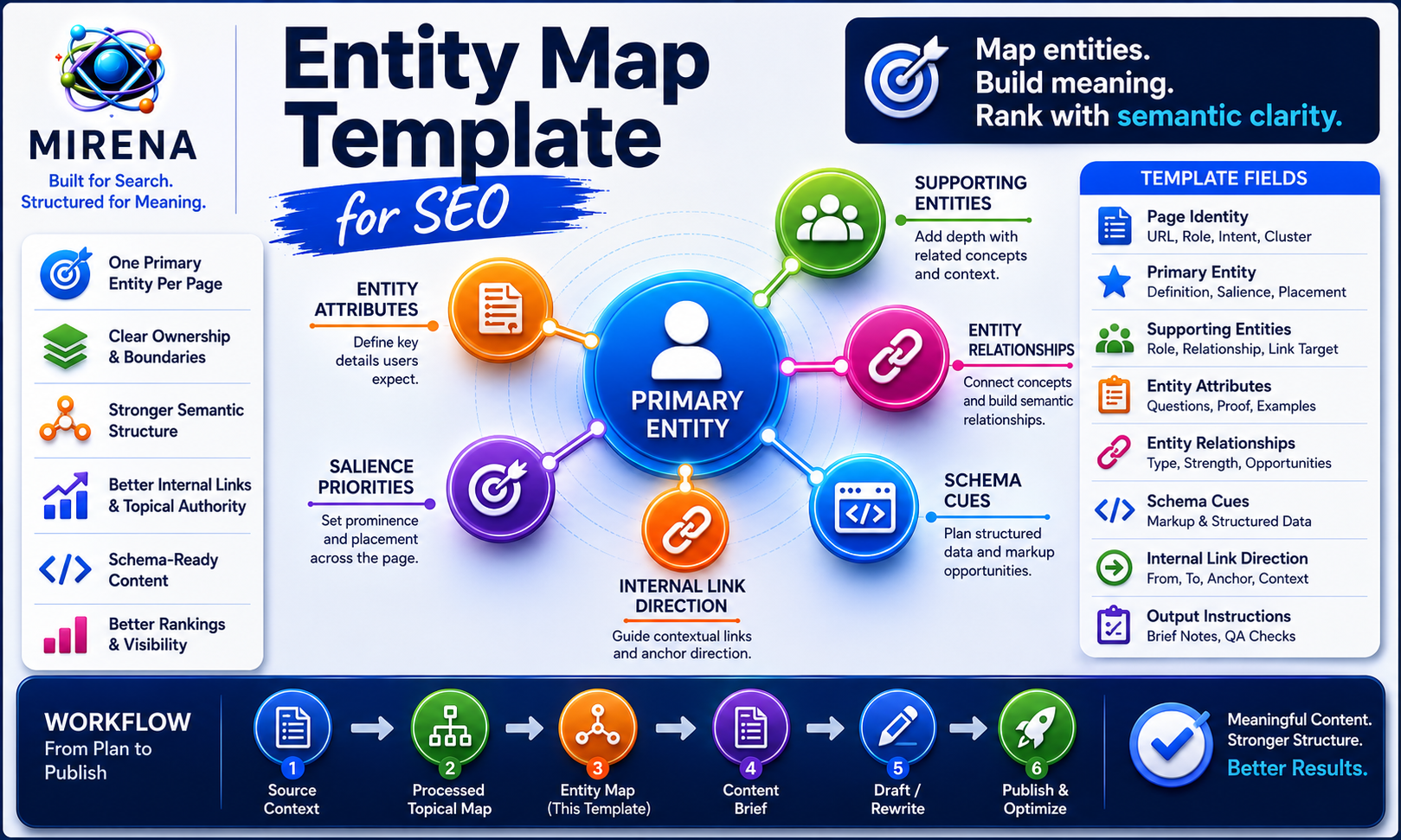
MIRENA’s entity map template helps SEO teams turn processed topical maps into semantic page structures.
Use it to define primary entities, supporting entities, entity attributes, relationships, salience priorities, schema cues, and internal link direction before content briefs or rewrites begin.
A processed topical map tells you which pages should exist. An entity map tells you which concepts each page should own, support, explain, and connect.
The template below gives you a working structure for that step.
What Is an Entity Map Template?
An entity map template is a structured worksheet for assigning primary entities, supporting entities, attributes, relationships, salience priorities, schema cues, and internal link direction to SEO pages or clusters.
It sits between topical mapping and content briefing.
The topical map defines the page plan. The entity map defines the semantic layer each page needs before a writer starts drafting.
If you need the foundation first, the guide to what an entity means in SEO explains how entities differ from keywords. This page focuses on the working template used to map entities across pages, clusters, briefs, rewrites, schema, and links.
A strong entity map template should help answer:
- Which entity does this page own?
- Which supporting entities belong on the page?
- Which attributes need coverage?
- Which nearby pages overlap?
- Which relationships need internal links?
- Which schema cues support the entity structure?
- Which entity instructions should pass into the content brief?
Without that layer, teams often move from page planning into writing too quickly.
That creates briefs with weak semantic direction.
Why Entity Maps Follow Processed Topical Maps
The processed topical map comes first.
It defines:
- clusters
- page roles
- page purpose
- intent labels
- page vs section decisions
- publishing priority
- internal link direction
The entity map comes next.
It defines:
- primary entity ownership
- supporting entity coverage
- entity attributes
- entity relationships
- salience priority
- semantic overlap checks
- schema cues
- internal link direction
- brief instructions
That order matters because an entity map needs a page structure to attach to.
A processed topical map may tell you that a site needs pages for “entity map template,” “entity map generator,” “entity salience,” and “entity attributes.” The entity map then decides which page owns each concept, which pages support it, and how those pages should link together.
The topical map generator workflow gives the page plan. The processed topical map template gives the upstream structure. This entity map template turns that structure into semantic instructions.
The workflow should look like this:
- Build the source context.
- Create the processed topical map.
- Assign entity ownership.
- Add supporting entities and attributes.
- Map relationships.
- Set salience priorities.
- Add schema and internal link direction.
- Turn the entity map into content brief instructions.
That gives writers a clearer route into drafting.
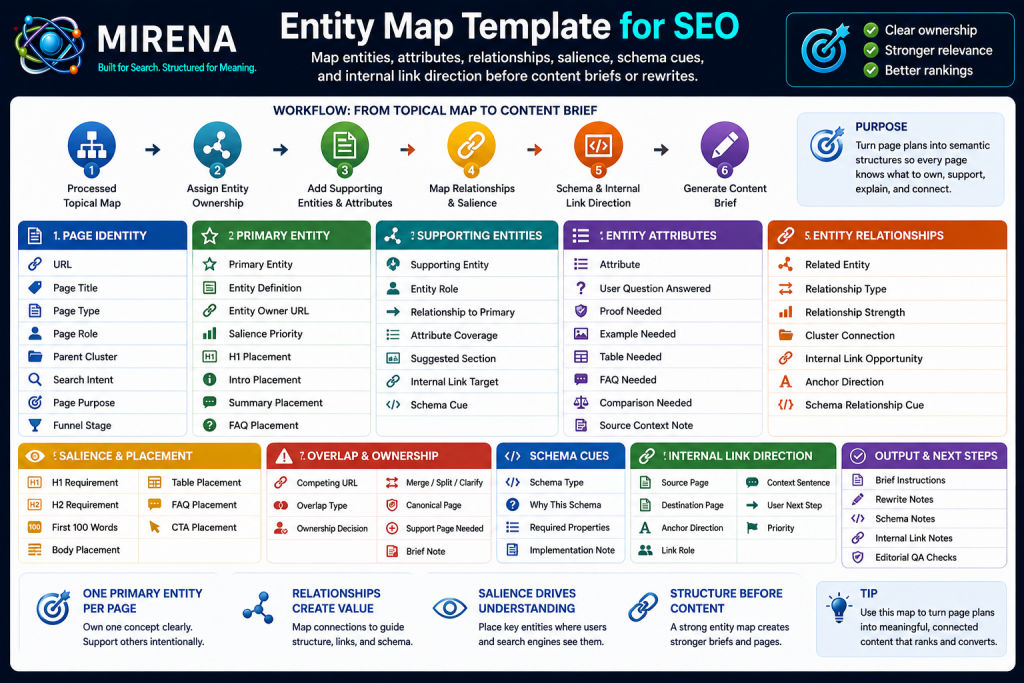
Entity Map Template Fields
Use the fields below to turn a page plan into an entity structure.
The template can live in a spreadsheet, Notion database, CMS field set, or MIRENA workflow. The format is flexible. The field logic should stay consistent.
Page Identity Fields
Start with the page identity. This connects the entity map to the processed topical map.
Use these fields:
- URL
- Page title
- Page type
- Page role
- Parent cluster
- Search intent
- Page purpose
- Funnel stage
These fields help prevent disconnected entity work.
For example, a page with the role “template page” should not receive the same entity instructions as a product page, comparison page, docs page, or proof page.
The page role shapes the entity structure.
Primary Entity Fields
Each page should have one primary entity.
Use these fields:
- Primary entity
- Entity definition
- Entity owner URL
- Entity salience priority
- Required H1 placement
- Required intro placement
- Required summary placement
- Required FAQ placement
The primary entity is the concept the page should own most clearly.
For this page, the primary entity is “entity map template.” The page should not try to own “entity map generator,” “entity salience,” and “entity attributes” at the same level. Those are supporting or linked concepts.
The entity salience in SEO workflow explains how prominence, placement, and semantic reinforcement help search systems understand the main concept of a page.
Supporting Entity Fields
Supporting entities add depth around the primary entity.
Use these fields:
- Supporting entity
- Entity role
- Relationship to primary entity
- Required attribute coverage
- Suggested section placement
- Internal link target
- Schema cue
For this page, supporting entities include:
- entity map
- primary entity
- supporting entity
- entity attributes
- entity relationships
- entity salience
- schema cues
- internal link direction
- content brief
Supporting entities should not be added as a loose list. Each one should have a role.
For example, “entity attributes” helps explain content depth. “entity relationships” helps explain semantic structure. “entity salience” helps explain placement priority. “semantic internal linking” helps explain how the entity map affects links.
Entity Attribute Fields
Attributes make entities useful.
A page should not only mention an entity. It should explain the details users expect around that entity.
Use these fields:
- Attribute
- User question answered
- Proof needed
- Example needed
- Table needed
- FAQ needed
- Comparison needed
- Source context note
For an entity map template, attributes may include:
- purpose
- role
- placement
- owner URL
- relationship
- proof need
- schema cue
- link direction
- brief instruction
The entity attributes workflow explains how attributes create semantic depth around a concept. This is why the template should ask for attributes instead of only entity names.
Entity Relationship Fields
Entities gain meaning through relationships.
Use these fields:
- Related entity
- Relationship type
- Relationship strength
- Cluster connection
- Internal link opportunity
- Anchor direction
- Schema relationship cue
For example:
- “entity map template” relates to “entity map generator” because the template can be filled manually, while the generator can create the structure through MIRENA.
- “entity map template” relates to “entity-led content briefs” because the entity map should become brief instructions.
- “entity map template” relates to “semantic internal linking” because entity relationships should guide contextual internal links.
The entity relationships workflow helps define how those concepts connect across the site.
Salience and Placement Fields
Entity salience should be planned before drafting starts.
Use these fields:
- H1 requirement
- H2 requirement
- H3 requirement
- First 100 words requirement
- Body placement
- Table placement
- FAQ placement
- CTA placement
The goal is not forced repetition.
The goal is clear placement, clean relationships, and strong contextual support.
For this page, “entity map template” should appear in the H1, opening section, definition, template fields, example, and FAQ. Supporting entities should appear where they help the reader understand the workflow.
For example, “entity attributes” belongs in the template fields and supporting entity section. “schema cues” belongs in the schema section. “internal link direction” belongs in the relationship and workflow sections.
Overlap and Ownership Fields
Entity maps help prevent semantic overlap.
Use these fields:
- Competing URL
- Overlap type
- Entity ownership decision
- Merge, split, or clarify
- Canonical page
- Support page needed
- Brief note
This field group is important when two pages are too similar.
For example:
https://semantecseo.com/templates/entity-map-template/should own the template format.https://semantecseo.com/use-cases/entity-map-generator/should own the product workflow.https://semantecseo.com/entity-seo/entity-map/should own the educational concept.https://semantecseo.com/entity-seo/entity-salience-in-seo/should own salience theory and placement logic.
Those pages can link to one another, but each page needs a distinct entity job.
If a cluster feels thin or duplicated, the entity gap audit workflow can help identify missing concepts, weak ownership, and overlap risk.
Output Fields
The final template fields should pass into production.
Use these fields:
- Brief ready entity instructions
- Rewrite notes
- Schema notes
- Internal link notes
- Editorial QA checks
This is where the entity map becomes useful.
It should not sit as a separate research sheet. It should feed the next workflow stage.
Once the map is complete, it can move into entity-led content briefs so writers receive clear instructions on the primary entity, supporting entities, attributes, relationships, salience priorities, and internal links.
How to Use the Entity Map Template
Start with the page plan.
Then fill the entity layer for each planned or existing URL.
Step 1: Start With the Processed Topical Map
Use the processed topical map as the source of page structure.
The map should already define page role, intent, purpose, and cluster position.
Step 2: Add the Planned or Existing URL
Each row should map to one planned or live URL.
This keeps entity ownership tied to a page, not to a loose topic.
Step 3: Assign One Primary Entity
Give the page one main semantic job.
For this page, the primary entity is “entity map template.”
Step 4: Add Supporting Entities
Add the concepts needed to explain the primary entity fully.
Supporting entities should clarify the topic, not distract from it.
Step 5: Define Entity Attributes
Add the details users need around each entity.
Attributes help decide which examples, tables, FAQs, and explanations belong on the page.
Step 6: Map Entity Relationships
Show how entities connect to each other.
This helps internal links, schema cues, and section flow.
Step 7: Set Salience Priorities
Decide which entities need stronger placement.
Mark H1, H2, intro, body, FAQ, and CTA needs.
Step 8: Check Overlap With Nearby Pages
Review pages in the same cluster.
Flag duplicate ownership, unclear boundaries, or competing URLs.
Step 9: Add Schema Cues
Mark structured data opportunities.
This may include WebPage, Article, FAQPage, BreadcrumbList, Organization, Product, SoftwareApplication, or HowTo.
Step 10: Add Contextual Internal Link Direction
Define which pages should link, where the link belongs, and what the anchor should communicate.
The semantic internal linking workflow explains how entity relationships can guide contextual links across a site.
Step 11: Convert the Map Into Content Brief Instructions
The final step is production.
The entity map should become instructions inside the brief. If you want MIRENA to create that structure from a topic, page, sitemap, source context, or processed topical map, use the entity map generator workflow.
Primary Entity Assignment
Each page should have clear entity ownership.
The primary entity defines the concept the URL should hold most strongly.
For example:
https://semantecseo.com/templates/entity-map-template/owns “entity map template.”https://semantecseo.com/use-cases/entity-map-generator/owns “entity map generator.”https://semantecseo.com/entity-seo/entity-salience-in-seo/owns “entity salience.”https://semantecseo.com/entity-seo/entity-attributes/owns “entity attributes.”
Those pages support one another, but they do not perform the same role.
That distinction is important because weak ownership creates overlap. If two pages target the same entity with the same intent, they may compete with each other instead of supporting the cluster.
The entity map template should flag that risk before a brief is created.
Use the ownership fields to decide:
- which page owns the entity
- which page supports the entity
- which page should link to the owner
- which page needs a narrower angle
- which page may need merging or splitting
Supporting Entities and Attributes
Supporting entities add context around the primary entity.
Attributes explain what users need to know about those entities.
For this page, the entity map might look like this:
- Primary entity: entity map template
- Supporting entity: primary entity
- Supporting entity: supporting entity
- Supporting entity: entity attributes
- Supporting entity: entity relationships
- Supporting entity: salience priorities
- Supporting entity: schema cues
- Supporting entity: internal link direction
- Supporting entity: content briefs
Each supporting entity needs attributes.
For example, “entity attributes” may need:
- definition
- role in content depth
- examples
- required page placement
- relationship to supporting entities
- relationship to content briefs
The entity map becomes stronger when each supporting entity has a clear reason to exist.
Entity Relationships and Ownership
Entity mapping helps show how concepts connect.
It also helps show which page should own each concept.
For example, this template page should explain the field structure. It should not fully replace the entity map guide, which can explain the broader SEO concept. It should also link to the entity map generator when users want MIRENA to build the structure.
That creates clean ownership:
- template page = working format
- generator page = product workflow
- educational page = concept explanation
- brief page = writing instructions
- schema page = markup support
Use relationship fields to document:
- parent concept
- child concept
- supporting concept
- adjacent concept
- conversion route
- schema relationship
- internal link opportunity
Clean relationship mapping helps prevent page drift.
Salience Priorities and Placement
Entity salience is not only about how often a phrase appears.
Placement and context are just as important.
The template should mark where high priority entities need to appear:
- H1
- H2
- intro
- first answer block
- section headings
- tables
- FAQs
- internal anchors
- metadata
- schema cues
For this page, “entity map template” needs prominent placement. “entity attributes,” “entity relationships,” “entity salience,” “schema cues,” and “internal link direction” need strong supporting placement.
The entity salience in SEO process explains how salience connects to prominence, proximity, and semantic reinforcement.
Do not overload the page with repeated phrases.
Use clear headings, contextual paragraphs, examples, and internal links to reinforce the entity structure naturally.
Schema Cues and Internal Link Direction
Entity maps support structured data and contextual internal links.
The template should include both.
Schema Cues
Schema cues help the team plan structured data before production.
Possible schema cues include:
- WebPage
- Article
- FAQPage
- BreadcrumbList
- Organization
- Person
- Product
- SoftwareApplication
- HowTo
The entity markup workflow explains how entity clarity supports structured data planning.
Do not add final schema too early. The schema plan should reflect the final approved page.
Internal Link Direction
Internal link direction should define:
- source page
- destination page
- anchor direction
- link role
- context sentence
- user next step
For example, this page should link to the entity map generator when describing MIRENA’s product workflow. It should link to entity-led content briefs when explaining how the entity map becomes writing instructions.
Those links should sit inside useful context, not in a disconnected list.
Entity Map Template Example
Here is a compact example for this page.
URL: https://semantecseo.com/templates/entity-map-template/
Primary entity: entity map template
Page role: template page
Intent: informational + commercial investigation
Parent cluster: templates
Workflow position: Source Context → Processed Topical Map → Entity Map → Content Brief → Draft/Rewrite → Internal Links
Supporting entities: entity map, primary entity, supporting entity, attributes, relationships, salience, schema cues, internal links, content briefs
Entity ownership note: This page owns template intent. It should link to the product workflow for entity map generation.
Internal link direction: Use contextual links to entity map generator, entity attributes, entity salience, entity relationships, semantic internal linking, and entity-led briefs.
Schema cues: WebPage, Article, FAQPage, BreadcrumbList
Brief output: The writer must explain how to move from processed topical map to entity map to content brief.
This example shows why the template should include both semantic fields and production fields.
The entity map is not only a research layer. It helps briefs, rewrites, schema, and internal links stay aligned.
MIRENA vs a Blank Spreadsheet
A spreadsheet can hold the entity map fields.
MIRENA helps decide what should go into those fields.
| Blank Spreadsheet | MIRENA Entity Map Template |
|---|---|
| Manual fields | Guided structure |
| Entity list | Entity ownership |
| Loose notes | Salience priorities |
| Link field | Anchor direction |
| Schema field | Schema cues |
| Page notes | Brief instructions |
Use the template manually if you already know the entity structure.
Use MIRENA when you need help assigning ownership, salience, attributes, schema cues, and contextual internal links from a processed topical map or page inventory.
The content brief generator can then turn those entity fields into writer ready instructions.
Build an Entity Map with MIRENA
Use MIRENA to turn your processed topical map into an entity map with primary entities, supporting entities, attributes, relationships, salience priorities, schema cues, and internal link direction.
The template gives you the structure.
MIRENA helps generate and validate the semantic layer.
If you want MIRENA to build the map, start with the entity map generator. If you are ready to move from entity mapping into production, use the content brief generator. If you are ready to subscribe, review MIRENA pricing.
FAQs About Entity Map Templates
What is an entity map template?
An entity map template is a structured format for assigning primary entities, supporting entities, attributes, relationships, salience priorities, schema cues, and internal link direction to SEO pages or clusters.
What should an entity map template include?
An entity map template should include page identity, primary entity, supporting entities, attributes, relationships, salience placement, overlap checks, schema cues, internal link direction, and brief instructions.
How do I use an entity map template for SEO?
Start with a processed topical map, assign one primary entity to each page, add supporting entities and attributes, map relationships, set salience priorities, and add schema and link notes.
How is an entity map different from a keyword list?
A keyword list shows phrases.
An entity map shows concepts, attributes, relationships, ownership, salience priorities, and semantic structure.
How does an entity map follow a topical map?
A topical map defines the page plan.
An entity map defines the semantic layer for each page, including entity ownership, attributes, salience, schema cues, and internal link direction.
What is a primary entity in an entity map?
A primary entity is the main concept a page should own semantically.
It should appear in prominent locations and guide the page structure.
What are supporting entities in an entity map?
Supporting entities are related concepts that add semantic depth, clarify context, and reinforce the primary entity.
What are entity attributes?
Entity attributes are characteristics, functions, relationships, examples, and expected details that explain an entity more fully.
Can an entity map help content briefs?
Yes.
Entity maps help content briefs define the primary entity, supporting entities, attributes, salience priorities, internal links, and schema cues before drafting.
Can MIRENA build an entity map for me?
Yes.
MIRENA can generate entity maps from topics, pages, sitemaps, source context, keyword sets, processed topical maps, and existing content.