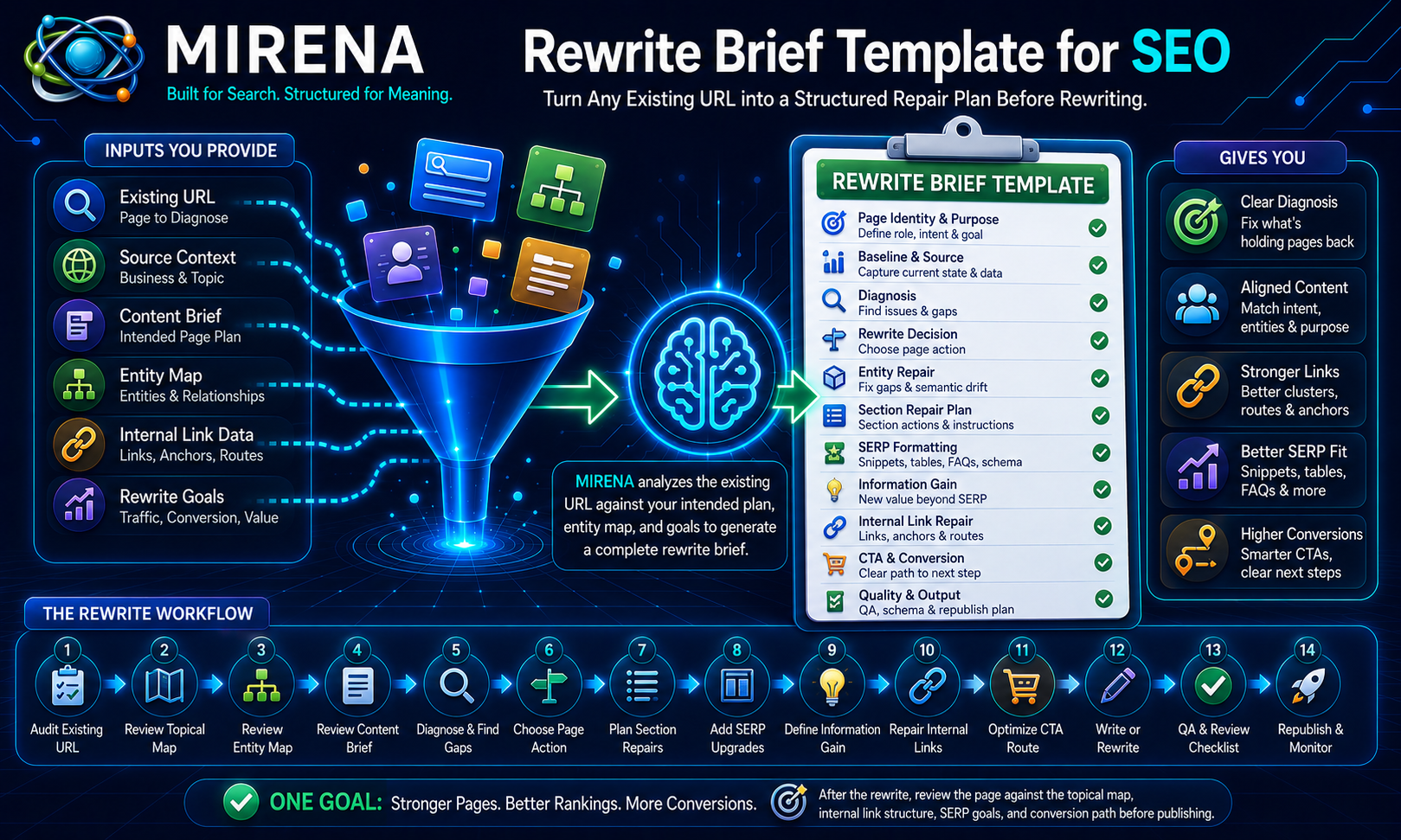
MIRENA’s rewrite brief template helps SEO teams turn existing pages into structured repair plans.
Use it to diagnose page purpose, search intent, entity gaps, section order, SERP formatting, internal links, CTA routes, and editorial QA before rewriting begins.
A content brief defines what a page should do.
A rewrite brief compares that intended state against the existing page.
The template below gives you a working format for turning an existing URL into a clear repair plan.
What Is a Rewrite Brief Template?
A rewrite brief template is a structured worksheet for diagnosing an existing page and turning the repair plan into writing instructions.
It defines what to keep, remove, rewrite, move, expand, merge, link, and review before republishing.
A rewrite brief is not the same as a light editing checklist.
A light edit may improve wording.
A rewrite brief diagnoses the page first.
It should explain:
- why the page is weak
- what the page should do instead
- which sections should stay
- which sections should be removed
- which sections should be rewritten
- which entities are missing
- which intent mismatch needs repair
- which internal links should change
- which CTA route should improve
- which SERP formats should be added
- which final page action applies
If you need the broader process first, the guide to rewriting existing SEO content explains how page repair differs from light editing.
This page focuses on the working template used inside the MIRENA workflow.
Why Rewrite Briefs Follow Content Briefs
A content brief defines the intended page.
A rewrite brief compares that intended state against the existing URL.
The content brief template defines:
- page purpose
- search intent
- reader state
- primary entity
- supporting entities
- section structure
- SERP targets
- internal link targets
- information gain requirements
- CTA direction
- editorial checks
The rewrite brief then asks a different question.
How far is the current page from that intended state?
That comparison creates the repair plan.
The rewrite brief identifies:
- what is broken
- what should stay
- what should be removed
- what should be rewritten
- what needs new sections
- what links need repair
- what CTA route needs change
- what final page decision applies
Teams that want MIRENA to generate the repair plan from an existing URL can use the SEO rewrite generator workflow after the intended page state is clear.
The workflow should look like this:
- Build the source context.
- Create or review the processed topical map.
- Build the entity map.
- Create the content brief.
- Compare the existing URL against the intended page.
- Create the rewrite brief.
- Rewrite the page.
- Repair internal links.
- Review before republishing.
That sequence prevents teams from rewriting pages without knowing what the page should become.
Rewrite Brief Template Fields
Use the fields below to turn an existing URL into a structured SEO rewrite plan.
The template can live in a spreadsheet, Notion database, CMS workflow, project board, or MIRENA output.
The format can change.
The logic should stay consistent.
Page Identity Fields
Start with the page identity.
These fields connect the existing URL to the intended page plan.
Use these fields:
- URL
- Page title
- Page type
- Current page role
- Intended page role
- Parent cluster
- Funnel stage
- Target keyword
- Secondary queries
- Current search intent
- Intended search intent
- Current page purpose
- Intended page purpose
- Primary CTA
These fields show the gap between the page as it exists now and the page it needs to become.
For example, a page may currently behave like a broad blog post but need to become a use case page.
Another page may currently mix product, support, and educational intent but need to become a focused comparison page.
The rewrite brief should make that difference clear before a writer starts.
Source and Baseline Fields
Source and baseline fields capture the current state of the page.
Use these fields:
- Source context
- Existing page summary
- Current traffic note
- Current ranking note
- Conversion note
- Last updated date
- Known business changes
- Product or service changes
- Existing internal links
- Existing metadata
- Existing schema
- Current page owner
These fields help the team avoid blind rewrites.
An old page may contain sections worth keeping.
It may also contain outdated product claims, weak internal links, stale schema, or a CTA route that no longer fits the business.
The baseline helps the editor understand what changed and why the rewrite is needed.
Diagnosis Fields
Diagnosis fields explain why the page needs repair.
Use these fields:
- Main rewrite reason
- Page purpose issue
- Search intent issue
- Entity gap
- Semantic drift
- Section order issue
- Thin section
- Buried answer
- Missing proof
- SERP format gap
- Internal link gap
- CTA gap
- Overlap or duplicate intent
- Technical or indexation note
This is the difference between a rewrite brief and a rewrite request.
A rewrite request says, “Improve this page.”
A rewrite brief says, “This page has a weak intro, mixed intent, missing supporting entities, no comparison table, poor internal links, and an unclear CTA route.”
The second version gives the writer a repair path.
The SEO rewrite checklist can support this diagnosis stage by helping teams review the existing URL before assigning rewrite actions.
Rewrite Decision Fields
Not every weak page should be rewritten.
Some pages need a refresh. Some need consolidation. Some should be split, redirected, removed, noindexed, or left alone.
Use these fields:
- Rewrite
- Refresh
- Expand
- Merge
- Split
- Redirect
- Remove
- Noindex
- Leave unchanged
- Decision rationale
- Decision owner
- Priority level
This decision should happen before writing begins.
A rewrite is useful when the page still has a clear role but needs stronger structure.
A refresh is useful when the information is outdated but the structure is sound.
A merge is useful when two pages serve the same intent.
A split is useful when one page tries to serve several different intents.
A redirect is useful when the page should point to a stronger destination.
A remove decision is useful when the page has no clear user or search role.
A noindex decision is useful when the page helps users but should not compete in search.
A leave unchanged decision is useful when the page already matches the intended plan.
This field group prevents teams from spending time rewriting pages that need a different action.
Entity Repair Fields
Entity repair fields compare the existing page against the intended entity map.
Use these fields:
- Current primary entity
- Intended primary entity
- Missing supporting entities
- Missing entity attributes
- Weak entity relationships
- Entity overlap warning
- Entity salience repair
- Entity placement notes
- Entity ownership decision
- Entity gap notes
Existing pages often drift away from the current site structure.
A page may repeat the target keyword but miss the supporting concepts.
Another page may mention the right entities but fail to explain their attributes.
Another page may overlap with a newer URL and weaken both pages.
The rewrite brief should compare the current page against the entity map template and flag missing primary entity clarity, weak supporting entities, missing attributes, weak relationships, shallow repetition, and overlap with nearby URLs.
The fix semantic drift workflow can support pages that no longer match the current topical map, product language, or entity structure.
Section Repair Fields
Section repair fields turn the diagnosis into writing instructions.
Use these fields:
- Current section
- Keep, remove, rewrite, move, expand, or merge
- New section title
- Section goal
- Entities to include
- Questions to answer
- Proof needed
- Examples needed
- SERP target
- Internal link target
- Writer instruction
- Editor note
Each current section should receive a decision.
Do not tell the writer to “make the page better.”
Tell the writer what each section needs.
For example:
- keep the definition but shorten it
- remove the outdated product claim
- move the direct answer above the background section
- expand the comparison section with a table
- rewrite the FAQ to match current search intent
- merge two repeated sections into one stronger explanation
- add internal links in the workflow section
The rewrite for structure workflow helps teams rebuild page hierarchy, heading order, answer placement, and section flow.
SERP Formatting Fields
SERP formatting fields update the page for current search result expectations.
Use these fields:
- Direct answer block
- Paragraph snippet target
- List snippet target
- Table target
- FAQ target
- PAA target
- Summary box
- Comparison table
- HowTo cue
- Schema cue
- Snippet loss note
Older pages often miss modern formatting opportunities.
They may bury answers, avoid tables, skip FAQs, or explain processes in dense paragraphs.
The rewrite brief should identify which formatting upgrades the page needs.
A definition page may need a concise answer block.
A process page may need an ordered list.
A comparison page may need a scannable table.
A support page may need clearer FAQs.
The SERP feature briefing workflow can support snippet, FAQ, table, list, and schema cue decisions.
Information Gain Fields
Information gain fields define what the rewrite should add beyond repeated SERP coverage.
Use these fields:
- Repeated SERP ideas to remove
- Missing relationship to add
- Proof gap
- Example gap
- First hand input request
- Decision support gap
- Comparison gap
- FAQ gap
- New angle
- Section upgrade note
A rewrite should not only say the same thing with different words.
It should make the page more useful.
For example, the rewrite may need:
- a clearer workflow example
- a missing entity relationship
- proof before the CTA
- a comparison table
- a stronger explanation of the user decision
- a first hand note from an audit, project, or implementation
- a new FAQ that answers a real objection
The information gain audit workflow can feed these upgrade notes into the rewrite brief before writing begins.
Internal Link Repair Fields
Internal link repair should happen inside the rewrite brief.
Use these fields:
- Existing link to keep
- Existing link to remove
- Missing destination URL
- Anchor direction
- Link role
- Context sentence
- User next step
- Commercial route
- Orphan page support
- Cluster route note
A page can have decent copy and still fail to support the site because the links are weak.
A rewrite may need to remove outdated links, add support links, route users to a stronger conversion page, or reconnect the URL to its cluster.
The rewrite for internal links workflow supports link repair during content refreshes.
The internal link briefing process helps teams plan anchor direction and placement before the rewrite starts.
CTA and Conversion Fields
CTA fields make the commercial path clear.
Use these fields:
- Current CTA
- Intended CTA
- CTA location
- CTA wording direction
- Supporting proof needed
- Conversion page target
- Pricing route
- Product route
- Demo or contact route
- Friction note
Some pages get traffic but do not move users anywhere useful.
The rewrite brief should identify the next step the page should support.
For a use case page, the next step may be pricing.
For a template page, the next step may be a generator workflow.
For an educational page, the next step may be a related brief, audit, or product workflow.
The CTA should not appear without support.
The brief should also explain what proof, example, or comparison needs to appear before the CTA.
Output Fields
Output fields help the rewrite move into production and review.
Use these fields:
- Rewrite summary
- Writer handoff notes
- Editorial QA checks
- Republish checklist
- Schema notes
- Internal link notes
- Follow up page opportunities
- Post publish review note
The rewrite summary should explain the repair plan in plain language.
Writer handoff notes should define the assignment.
Editorial QA checks should confirm that the rewritten page follows the plan before republishing.
Schema notes should be finalized after the approved draft.
Internal link notes should confirm that links are placed contextually.
Follow up page opportunities should capture new pages that surfaced during the rewrite.
How to Use the Rewrite Brief Template
Start with the existing URL.
Then compare the current page against the intended page plan, entity map, and content brief.
Step 1: Start With the Existing URL
Add the URL, page title, current page role, current intent, and current purpose.
This creates the baseline.
Step 2: Add the Content Brief or Intended Page Plan
Use the content brief to define what the page should become.
The content brief template gives the intended page purpose, search intent, entities, sections, SERP targets, links, and review checks.
Step 3: Add the Entity Map
Use the entity map to define semantic repair.
The entity map shows the intended primary entity, supporting entities, attributes, relationships, salience priorities, and internal link direction.
Step 4: Diagnose the Current Page
Identify the main rewrite reason.
Look for weak intros, buried answers, missing entities, thin sections, outdated claims, internal link gaps, weak CTAs, and poor SERP formatting.
Step 5: Compare Current Intent With Intended Intent
Check if the existing page still matches the searcher’s needs.
A page may have started as an educational article but now needs to become a commercial investigation page.
A page may mix intent because old sections were added over time.
The rewrite for search intent workflow can help identify intent mismatch before writing begins.
Step 6: Compare Current Entity Coverage With the Entity Map
Check missing entities, missing attributes, weak relationships, semantic drift, and entity overlap.
This helps the rewrite repair meaning, not only wording.
Step 7: Decide the Page Action
Choose one main action:
- rewrite
- refresh
- expand
- merge
- split
- redirect
- remove
- noindex
- leave unchanged
Record the rationale.
Step 8: Mark Section Actions
Assign an action to each current section.
Use keep, remove, rewrite, move, expand, or merge.
Then add new section titles and section level instructions.
Step 9: Add SERP Formatting Upgrades
Add direct answer blocks, tables, process lists, summary boxes, FAQs, PAA answers, or comparison blocks where needed.
Step 10: Add Information Gain Requirements
Add the new value the page needs.
This may include first hand input, examples, proof, decision support, missing relationships, or improved comparisons.
Step 11: Add Internal Link Repair Notes
List links to keep, remove, or add.
Define destination URLs, anchor direction, placement notes, user next step, and commercial route.
Step 12: Add CTA Route Changes
Define the current CTA and intended CTA.
Add proof or context needed before the CTA appears.
Step 13: Add Writer Handoff Notes
Summarize the assignment for the writer.
The handoff should explain the page action, section actions, entities, links, SERP upgrades, exclusions, and CTA route.
Step 14: Add Editorial QA Checks
Define how the rewritten page will be reviewed.
The editor should check the rewritten page against the diagnosis, entity map, section repairs, internal links, SERP formatting, information gain requirements, and CTA route.
Existing Page Diagnosis
Rewriting starts with diagnosis.
The rewrite brief should explain why the page needs repair before anyone changes the copy.
The diagnosis should identify:
- current page purpose
- current search intent
- weak intro
- buried answer
- missing entities
- thin sections
- outdated claims
- weak proof
- SERP format gaps
- poor internal links
- weak CTA route
- overlap with another URL
- indexation or technical notes
This prevents surface level rewrites.
For example, a page may not need new wording. It may need a better answer block, a different section order, stronger entity coverage, a missing comparison table, and internal links to the right cluster pages.
The SEO rewrite checklist can support this stage before rewrite actions are assigned.
Rewrite, Refresh, Merge, Split, Redirect, Remove, or Noindex
The correct action is not always a rewrite.
A rewrite brief should force a clear decision before production begins.
Rewrite
Rewrite when the page has a clear role but weak structure.
This may involve changing the intro, section order, entity coverage, FAQs, links, and CTA route.
Refresh
Refresh when the information is outdated but the structure is sound.
This may involve updating dates, examples, product notes, screenshots, data, internal links, and claims.
Expand
Expand when the page has a valid role but thin support.
This may involve adding examples, FAQs, proof, supporting entities, or a process section.
Merge
Merge when two pages serve the same intent.
The weaker page should support the stronger page or be consolidated into it.
Split
Split when one page serves several different intents.
For example, one URL may try to explain a concept, compare tools, and sell a product at the same time. Those may need separate pages or clearer section boundaries.
Redirect
Redirect when a URL should pass users to a stronger destination.
This is common when an old page has been replaced by a better page.
Remove
Remove when the page has no useful role for users or search.
This should be handled with care and reviewed before publishing changes.
Noindex
Noindex when a page is useful to users but should not compete in search.
Examples may include some internal support resources, account pages, or thin utility pages.
Leave Unchanged
Leave the page unchanged when it already matches the intended page plan.
Not every page in a rewrite queue needs work.
Entity Gaps and Semantic Drift
Existing pages often drift away from the current topical map.
This happens when content is updated over time without a clear entity plan.
The rewrite brief should compare the page against the entity map template and flag:
- unclear primary entity
- weak supporting entities
- missing attributes
- shallow entity mentions
- weak relationships
- entity overlap with nearby URLs
- old terminology
- disconnected examples
- missing schema cues
- weak internal link direction
Semantic drift can happen slowly.
A page may begin as a focused guide and become a collection of unrelated additions.
The rewrite brief should bring the page back to its intended role.
The fix semantic drift workflow supports pages that no longer match the current site structure, source context, product language, or entity map.
Section Restructuring and Rewrite Instructions
Section level instructions are more useful than vague rewrite notes.
Each section should receive one action:
- keep
- remove
- rewrite
- move
- expand
- merge
Then each section should receive instructions.
For example:
Current section: What is a rewrite brief?
Action: Rewrite New section goal: Define the template in one direct paragraph, then explain how it differs from a content brief. Entities to include: rewrite brief template, existing page, repair plan, content brief SERP target: paragraph snippet Internal link target: rewrite existing SEO content Writer instruction: Answer first, then explain why diagnosis comes before rewriting. Editor note: Confirm the section does not drift into a generic editing checklist.
This level of instruction gives the writer a clear path.
The rewrite for structure workflow helps teams rebuild heading order, answer placement, section depth, and page flow.
SERP Formatting and Information Gain Upgrades
Rewrites should update the page for current SERP expectations.
The rewrite brief should identify:
- direct answer blocks
- summary boxes
- comparison tables
- process lists
- FAQs
- PAA answers
- proof sections
- examples
- schema cues
SERP formatting helps the page answer faster and scan more clearly.
Information gain helps the page add value beyond repeated SERP coverage.
The rewrite brief should define:
- repeated ideas to remove
- missing relationships to add
- proof gaps
- example gaps
- first hand input needs
- decision support gaps
- comparison gaps
- FAQ gaps
- new angles
- section upgrades
The information gain audit workflow can feed upgrade notes into the rewrite brief.
The SERP feature briefing workflow can guide snippet, FAQ, table, list, and schema cue decisions.
Internal Link Repair and CTA Routing
Internal links and CTAs should be repaired inside the rewrite brief.
They should not be added after the draft is finished.
The template should identify:
- links to keep
- links to remove
- missing destination URLs
- anchor direction
- link role
- placement note
- context sentence
- user next step
- commercial route
- orphan page support
- cluster route note
This helps the rewritten page fit the site structure.
A page may need to link back to a hub.
It may need to support a conversion page.
It may need to reconnect an orphan page.
It may need to remove links that point to outdated URLs.
CTA routing should define:
- current CTA
- intended CTA
- destination URL
- CTA placement
- wording direction
- proof needed before the CTA
- friction note
The rewrite for internal links workflow supports link repair during content refreshes. The internal link briefing process helps teams plan anchor direction and placement before writing.
Rewrite Brief Template Example
Here is a compact example for this page.
URL: https://semantecseo.com/templates/rewrite-brief-template/
Primary entity: rewrite brief template
Page role: template page
Intent: informational + commercial investigation
Parent cluster: templates
Workflow position: Source Context → Processed Topical Map → Entity Map → Content Brief → Rewrite Brief → Draft/Rewrite → Internal Links
Current issue: New page, no rewrite needed yet.
Rewrite use case: Show how existing URLs can be diagnosed before refresh.
Supporting entities: rewrite brief, content refresh, entity gaps, section repair, SERP formatting, internal link repair, CTA route, editorial QA
SERP targets: paragraph snippet, ordered list, FAQPage, PAA, template block, comparison table
Internal link direction: Use contextual links to content brief template, SEO rewrite generator, rewrite checklist, semantic drift, rewrite for internal links, information gain audit, and internal link briefing.
Information gain note: Explain that a rewrite brief compares the intended state to the current state before writing begins.
Writer handoff note: The writer must explain how the template turns an existing URL into a repair plan.
Editorial QA note: The editor should confirm that the page includes diagnosis, template fields, rewrite decisions, section actions, link repair, CTA routing, example, and clear next steps.
This example shows how a rewrite brief becomes a production tool.
It is not only a checklist.
It turns an existing page into a structured repair assignment.
MIRENA vs a Blank Rewrite Checklist
A checklist can remind teams what to review.
MIRENA helps diagnose what should change and why.
| Blank Rewrite Checklist | MIRENA Rewrite Brief Template |
|---|---|
| Review prompts | Diagnosis and repair actions |
| Manual section notes | Section instructions |
| General edit tasks | Intent and entity repair |
| Link reminders | Internal link repair |
| CTA note | CTA route repair |
| Loose review | Editorial QA checks |
Use the template manually if you already know the diagnosis, repair actions, entity gaps, section changes, links, and CTA route.
Use MIRENA when you need help turning an existing URL into a structured rewrite plan.
The template gives you the format.
MIRENA helps generate and validate the repair plan.
Generate a Rewrite Brief with MIRENA
Use MIRENA to turn an existing URL into a structured repair plan with diagnosis, section changes, entity gaps, SERP upgrades, internal link fixes, CTA routing, and editorial QA checks.
The template gives you the structure.
MIRENA helps fill the rewrite brief from source context, existing URLs, content briefs, entity maps, topical maps, and rewrite goals.
If you want MIRENA to generate the repair plan, start with the SEO rewrite generator. If you need to define the intended page first, use the content brief template. If you are ready to subscribe, review MIRENA pricing.
FAQs About Rewrite Brief Templates
What is a rewrite brief template?
A rewrite brief template is a structured format for diagnosing an existing page and turning repair actions into writing instructions before rewriting starts.
What should a rewrite brief include?
A rewrite brief should include page diagnosis, intended page purpose, search intent repair, entity gaps, section actions, SERP upgrades, internal link fixes, CTA routing, and editorial QA checks.
How do I use a rewrite brief for SEO?
Start with the existing URL, compare it against the intended content brief and entity map, diagnose gaps, choose the page action, mark section repairs, add links, and define QA checks.
How is a rewrite brief different from a content brief?
A content brief defines the intended page.
A rewrite brief compares the existing page to that intended state and defines the repair actions needed before republishing.
How do I decide if a page should be rewritten?
Rewrite the page when it still has a clear role but needs structure, intent, entity, link, SERP, or CTA repair.
If the page overlaps heavily or has no clear role, merging, redirecting, removing, or noindexing may be better.
Should a rewrite brief include entity gaps?
Yes.
A rewrite brief should identify missing entities, weak attributes, semantic drift, entity overlap, and salience repairs before drafting starts.
Should a rewrite brief include internal links?
Yes.
A rewrite brief should define links to keep, links to remove, missing destination URLs, anchor direction, placement notes, and commercial routes.
Can a rewrite brief improve content refreshes?
Yes.
A rewrite brief helps content refreshes repair outdated information, weak structure, missing entities, thin sections, poor links, and outdated SERP formatting.
Can MIRENA generate a rewrite brief from a URL?
Yes.
MIRENA can use an existing URL, source context, entity map, content brief, and rewrite goal to generate a structured rewrite brief.
What happens after the rewrite brief is complete?
After the rewrite brief is complete, the page can move into rewriting, internal link repair, schema review, editorial QA, republishing, and post publish review.